

Real estate email automation turns idle contacts into appointments by running a small set of timed and trigger-driven sequences that do the follow-up work for you. Done right, it means every new lead gets a welcome message within minutes, every past client hears from you on schedule, and every cold contact gets one honest shot at re-engagement before you cut them loose. The benefit isn’t more emails. It’s consistent, hands-off follow-up that saves you hours a week and makes clients feel remembered instead of processed. Begin with automating a single sequence focused on welcoming new leads.
TL;DR:
- Automating a single welcome sequence for new leads can generate significant engagement within the first 10 days, especially with a personalized video.
- Proper data cleanup—merging duplicates, standardizing contact info, and tagging lead sources—is essential before launching automation to prevent errors and duplicate sends.
- Legal compliance requires clear opt-out options, accurate headers, and domain authentication; ignoring these risks deliverability and legal breaches.
- Key performance indicators include reply and appointment rates, conversion to sales, and engagement with property content, not just open rates.
- Small teams or solo agents can start with one sequence and gradually adopt full automation once they master the basics, supported by managed services if needed.
Table of Contents
- Which Automation Approaches Fit Your Business Goals?
- What Should Your Welcome and Nurture Sequences Say?
- How Do You Prep Your Data Before You Automate?
- What Do CAN-SPAM and Deliverability Rules Require?
- What KPIs Actually Prove Your Emails Are Working?
- How Does an Agent Actually Run This Without Getting Overwhelmed?
- What Would Jason’s Three-Week Starter Plan Look Like?
- Let ex.plo.re Run Your Follow-Up While You Run Your Business
- Where to Read the Original Guidance
- Sources
- FAQ
Which Automation Approaches Fit Your Business Goals?
Not every lead deserves the same treatment, and that’s the first thing agents get wrong when they set up automation. You’re not building one machine. You’re building four, each aimed at a different stage of the client relationship.
- CRM-driven sequences handle the predictable stuff: a new lead fills out a form, and a preset chain of emails goes out over days or weeks. Use this for anyone entering your pipeline cold.
- Behavior-triggered emails react to what someone does, not just who they are. A buyer who clicks into three listings in one visit should get a different message than one who opens an email and does nothing.
- Property and market alerts run on saved searches and MLS feeds. These keep active buyers engaged without you lifting a finger, and they’re often the highest-open-rate email type you’ll send.
- Anniversary and milestone emails target past clients on a fixed calendar, homeownership anniversaries, birthdays, tax season, and they’re built for one purpose: referrals.
If you’re a solo agent with limited bandwidth, prioritize the welcome sequence and alerts first. Full marketing automation with behavior scoring and branching logic makes more sense once you’re running a team or have a lead volume that makes manual triage impossible. NAR’s 2025 technology survey found agents adopt tools mainly to save time and improve the client experience, not to add complexity, so resist the urge to overbuild before you’ve mastered the basics.
What Should Your Welcome and Nurture Sequences Say?
You don’t need twenty templates. You need three sequences that actually run, and a clear sense of when to retire a contact who’s gone cold.
- Welcome sequence (5 emails over 10 days). Day 0: instant reply confirming you got their inquiry, plus a direct next step. Day 1: introduce yourself and your local expertise. Day 3: send three listings matched to their stated criteria. Day 6: share a quick market snapshot for their target neighborhood. Day 10: a soft ask, “Want to hop on a 15-minute call this week?”
- Monthly nurture (ongoing). Skip the generic newsletter. Rotate three content types: hyperlocal market data (median days on market, price shifts), a 60-second video walkthrough or market update, and a brief client success story. This beats a static “here are five listings” blast because it gives people a reason to open the next one.
- 90-day re-engagement (3 emails). Email 1 asks directly if their goals changed. Email 2 offers a no-pressure value piece, a home valuation or refinanced-rate comparison. Email 3 is a last check-in with a clear opt-down option. If there’s no response after that, move them to a low-frequency quarterly list instead of deleting them outright.
Pro Tip: Insert a short, unscripted personal video into email 2 of your welcome sequence. Practitioner data from real estate coaching programs shows reply rates significantly increasing when agents include a short personal video when agents swap a text paragraph for 60 seconds of face-to-camera video.
For a deeper breakdown of cadence and copy, this step-by-step nurture guide walks through building each stage from scratch.
How Do You Prep Your Data Before You Automate?
Automation amplifies whatever is already in your database, good or bad. If if your contact list has issues, automation can amplify those problems.
- Pick one system of record. Decide which platform owns lead stage, contact info, and source tags: your CRM, not your inbox, not a spreadsheet someone updated in 2023.
- Dedupe before you connect anything. Merge duplicate contacts and standardize how you format phone numbers, names, and email addresses so your CRM doesn’t split one lead into two.
- Preserve every opt-out. When you migrate or merge lists, unsubscribe flags have to travel with the contact, not get reset by the import.
- Tag lead source on every record. Website form, open house sign-in, MLS alert, referral, each source behaves differently, and you’ll want that data later when you measure results.
Run a test import of 20 to 30 contacts before you load your full list, and check that tags, stages, and opt-outs landed correctly. A clean database is a prerequisite for automation that works. If your systems aren’t aligned on who owns which field, integrations create duplicate sends and trap contacts in the wrong sequence entirely.
Pro Tip: Give week one entirely to data cleanup. It feels slow, but every hour spent deduping now saves you from an embarrassing double-send to a client who already closed.
What Do CAN-SPAM and Deliverability Rules Require?
Permission to email someone doesn’t erase your legal obligations, a common misread that gets agents in trouble. The FTC’s CAN-SPAM compliance guide requires every commercial email to include accurate header and subject information, a valid physical postal address as required by CAN-SPAM, and a clear, working opt-out link that you honor promptly.
- Never upload a purchased or scraped contact list without checking its provenance; the FTC specifically warns that purchased lists often include people who already opted out elsewhere.
- Authenticate your sending domain with SPF and DKIM before you launch any sequence at volume.
- Warm up a new sending domain gradually rather than blasting your full list on day one, and monitor bounce and complaint rates weekly.
These aren’t optional best practices. They’re the difference between landing in the inbox and getting flagged as spam before a client ever sees your name.
What KPIs Actually Prove Your Emails Are Working?
Open rate tells you almost nothing on its own. It’s a vanity number that feels good and drives no decisions. Track these instead:
- Reply rate and appointments booked per 100 leads, the number that connects directly to revenue.
- Conversion to listing agreement or closed sale, tracked against lead source so you know which channel actually pays off.
- Click rate on property and market content, a leading indicator of who’s still actively looking.
- Unsubscribe rate by sequence, which tells you exactly where your content or cadence is off.
Set a baseline over your first 30 days, then run one A/B test at a time, subject line first, send time second. Tag every lead by source at intake so you can measure time-to-conversion instead of guessing which sequence deserves the credit.
How Does an Agent Actually Run This Without Getting Overwhelmed?
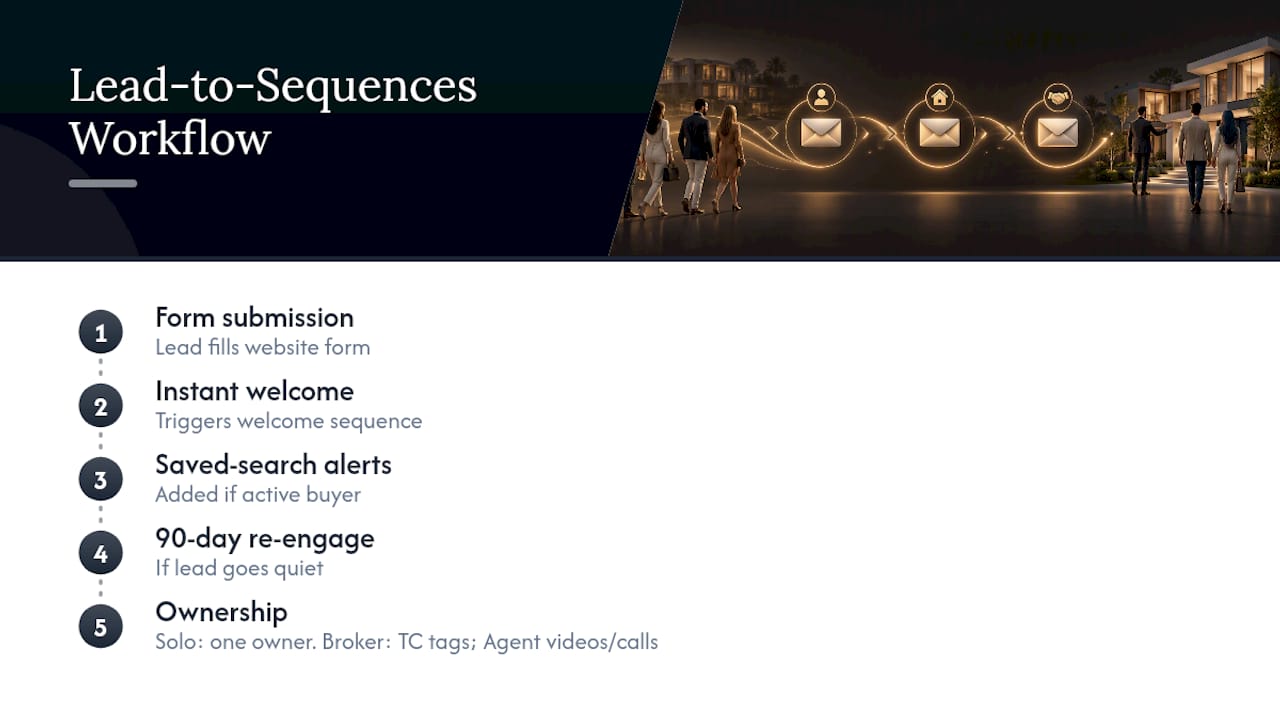
Here’s what a working setup looks like in practice. A lead fills out a website form, triggers an instant welcome sequence, gets added to weekly saved-search alerts if they’re an active buyer, and drops into 90-day re-engagement if they go quiet. On a solo desk, one person owns all of it. On a broker team, the transaction coordinator often handles data entry and tagging while the agent handles the personal video touches and the follow-up calls.
Plo builds and runs exactly this kind of email marketing workflow for agents and brokerages who want the sequences live without spending their own weekends configuring triggers. The setup scales the same way whether you’re a single producer or managing a five-agent team.
What Would Jason’s Three-Week Starter Plan Look Like?
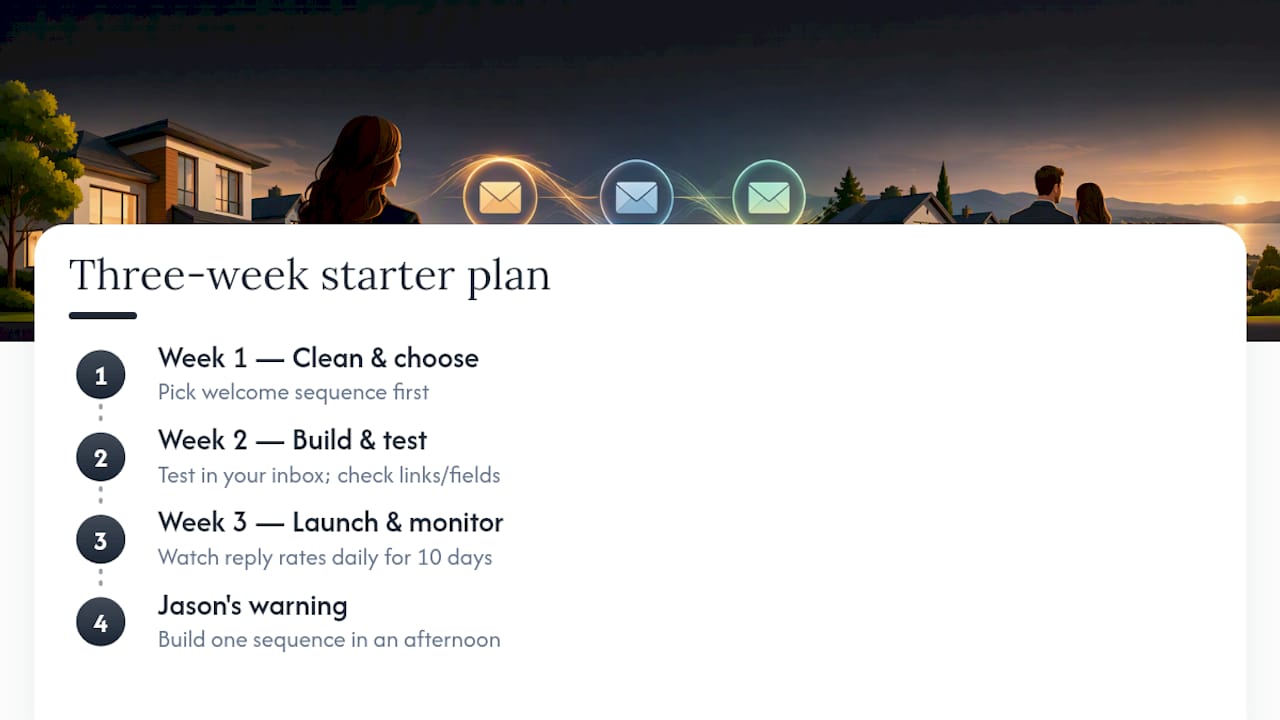
Week one: clean your data and pick one sequence, welcome emails first, always. Week two: build it, test it on your own inbox, check every link and merge field twice. Week three: launch it live and watch reply rates daily for the first ten days.
Most agents underestimate the time commitment. Building one sequence well takes a focused afternoon, not a week. The mistake isn’t lack of time. It’s trying to build all four sequence types before you’ve proven the first one works.
— Jason
Let ex.plo.re Run Your Follow-Up While You Run Your Business
Building three sequences, cleaning a database, and monitoring deliverability is doable solo, but it’s also exactly the kind of ongoing work that quietly eats your Tuesday afternoons. Plo runs this as a managed service: our team builds your welcome sequence, monthly nurture, and re-engagement flow, connects them to your CRM, and keeps them compliant and deliverable while you spend your time on showings and closings instead of email headers.
Solo agents who want the sequences running without touching a template belong in the Marketing Suite at $445 per month. Teams that want a dedicated hand building and optimizing every campaign should look at the Marketing Manager service at $1,000 per month, paired with lead flow through Leads Guaranteed at $5,899 per month for agents who want both automation and a steady stream of new contacts to put into it. Check current plan details and get started at Ex.
Where to Read the Original Guidance
The FTC’s CAN-SPAM compliance guide covers the legal requirements in full. NAR’s 2025 Technology Survey Report benchmarks agent tech adoption, and the CR Equity AI research brief offers a wider view of automation trends reshaping brokerage operations.
Sources
- CAN-SPAM Act: A Compliance Guide for Business
- 2025 REALTORS® Technology Survey Report
- Lead Nurture Email Sequences for Real Estate Agents | Krista Mashore
FAQ
What Are the Top CRMs for Real Estate Agents?
There’s no single “top five” that fits every agent; the right CRM depends on team size, budget, and whether you need built-in marketing automation or just contact management. Look for one that integrates with your website forms, MLS alerts, and email sequences without manual data entry, since that integration is what actually saves you time day to day.
How Much Would an Agent Make on a $300,000 Home Sale?
Commission splits vary by brokerage and market, but a common structure sees the listing and buyer’s agents each earn roughly 2.5 to 3% of the sale price before their brokerage split. On a $300,000 sale, that’s often somewhere between $7,500 and $9,000 gross per side before any split with the brokerage, so actual take-home varies widely by contract.
What Is the 80/20 Rule for Realtors?
The 80/20 rule, borrowed from the Pareto principle, suggests roughly 80% of an agent’s business comes from about 20% of their efforts or relationships, often repeat clients and referrals. In practice, it means your anniversary and milestone email sequences targeting past clients deserve more attention than most agents give them.
What Are the Best Email Automation Tools for Real Estate?
The best tool is the one that connects directly to your CRM and MLS feed so alerts and sequences trigger automatically instead of requiring manual list uploads. Plo builds and manages this kind of connected email automation workflow for agents who’d rather not evaluate and configure software themselves.
How Long Until I See Results From Email Automation?
Most agents see measurable engagement, opens, clicks, and early replies, within the first two to three weeks of launching a welcome sequence. Conversion to appointments and listings typically takes longer to show clearly, often 60 to 90 days, since it depends on where each lead was in their buying or selling timeline when they entered your pipeline.





