
Facebook Ads Not Working? 9 Fixes for Leads, Tracking, and Learning Limited in 2026
Your Facebook ads are running. Meta is spending your budget. People are clicking. But where are the leads?
Before you increase your advertising budget or rebuild your campaign, check what Meta is actually measuring.
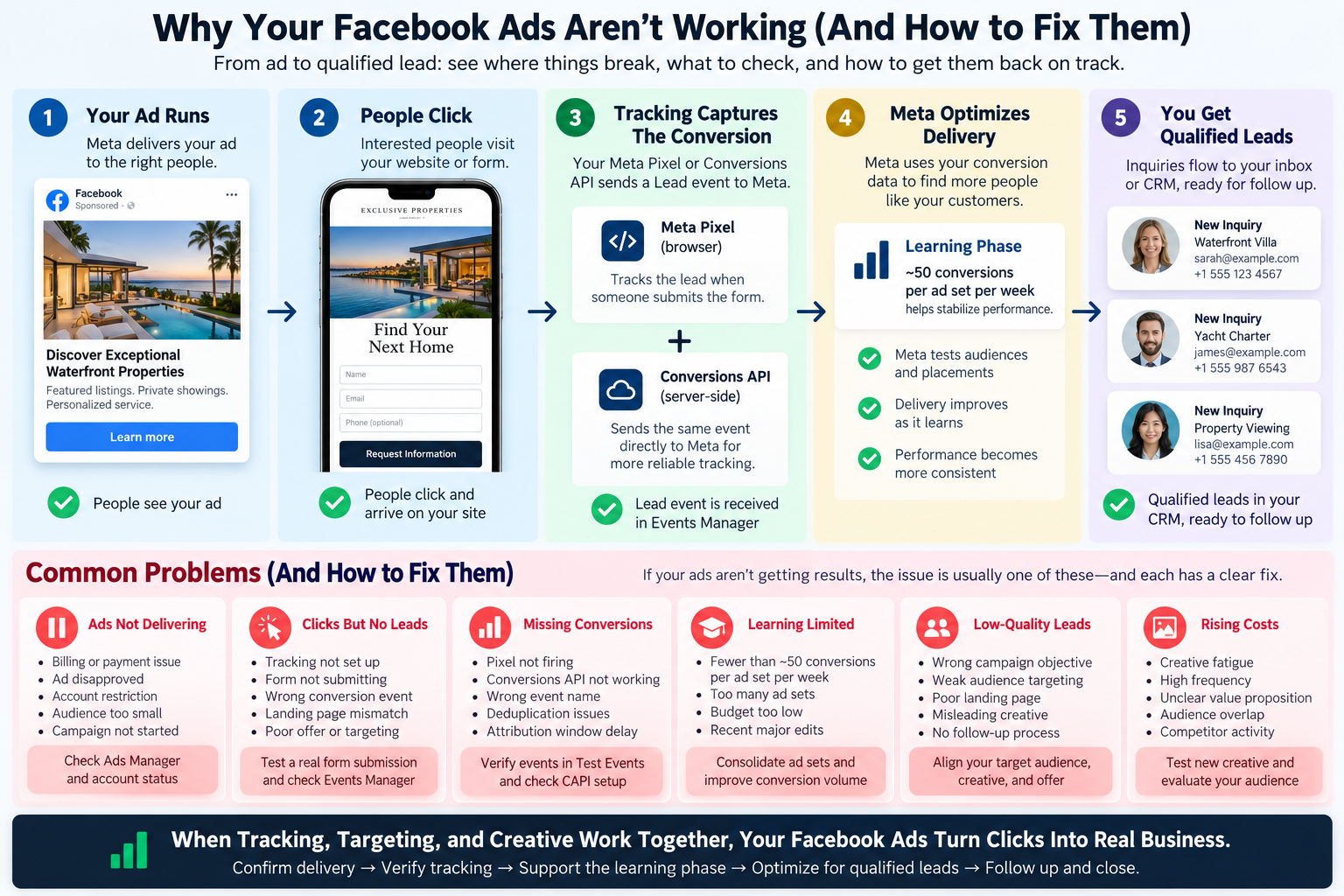
The most common reasons Facebook ads underperform include tracking errors, incorrect campaign objectives, insufficient conversion data, poor landing pages, account restrictions, and weak creative. Most can be identified without replacing your entire campaign.
For real estate agents, yacht brokers, luxury brands, and businesses that depend on qualified inquiries, the objective is not simply to generate traffic. It is to turn advertising into measurable conversations, appointments, and customers.
Here’s how to find the problem and fix it.
Key Takeaways
| Problem | What it means | First action |
|---|---|---|
| Ads not delivering | Billing, approval, audience, or account problem | Check Ads Manager Delivery status |
| Clicks but no leads | Tracking, offer, or landing page problem | Test an actual form submission |
| Missing conversions | Meta Pixel or Conversions API configuration issue | Check Events Manager |
| Learning Limited | Insufficient optimization-event volume | Review objective, budget, and ad-set structure |
| Low-quality leads | Campaign optimizing for the wrong outcome | Measure qualified inquiries |
| Rising advertising costs | Audience, creative, or conversion friction | Review recent performance and test one change |
The most important lesson: More clicks do not automatically produce better customers. Better conversion signals, relevant creative, and a clear follow-up process help turn advertising into business.
1. Why Are My Facebook Ads Not Working? Start With Ads Manager
Before troubleshooting the website, determine whether your advertisements are actually delivering.
Open Meta Ads Manager and examine the Delivery column at the campaign, ad set, and advertisement levels.
Common statuses include:
- Active: Your advertisement is eligible to deliver. This does not guarantee impressions or results.
- In Review: Meta is evaluating your advertisement before approval.
- Rejected: The advertisement has failed review against an applicable policy.
- Learning: Meta is gathering information to optimize delivery.
- Learning Limited: Meta predicts that the ad set will not receive enough optimization events to stabilize.
- Scheduled or Off: Delivery has not started or has been paused.
If an advertisement is not spending, check billing, account restrictions, campaign dates, budget controls, audience settings, and bid strategy.
If it is spending but failing to generate meaningful results, the investigation moves to your conversion tracking and sales funnel.
Pro Tip: Do not rebuild a functioning campaign because a single day’s numbers look disappointing. Check the delivery history and measure the actual business outcome before editing.
2. Facebook Ads Getting Clicks but No Leads? Check Your Website Tracking
One of the most expensive advertising mistakes is treating a click as a conversion.
A person clicking an advertisement is not the same as someone requesting a showing, booking a call, submitting a yacht inquiry, or purchasing a service.
These actions must be measured separately.
What should your Meta Pixel track?
For most lead-generation websites, the events worth reviewing include:
- PageView: Someone visited your website.
- ViewContent: Someone viewed a meaningful page, such as a property or product listing.
- Lead: Someone successfully submitted an inquiry.
- CompleteRegistration: Someone completed a defined registration.
- Schedule: Someone booked an appointment, where configured.
- Purchase: Someone completed an actual transaction.
Your website may show hundreds of PageView events while recording no Lead events.
This does not necessarily mean your advertisement failed. It may mean your tracking was never configured to report completed form submissions.
How to test your Meta Pixel
- Open Meta Events Manager.
- Select the correct dataset or pixel.
- Open Test Events.
- Visit the landing page.
- Complete a real test form submission.
- Confirm that the expected conversion event appears.
A Lead event should represent a successful lead action, not merely someone clicking the Submit button.
If the form fails validation, no successful lead should be counted.
For a more complete tracking framework, see our 9-step lead attribution guide for real estate agents.
3. Do You Need Meta Conversions API If You Already Have a Pixel?
Not every small advertising campaign requires a complicated server-side integration.
However, advertisers should understand what the Conversions API actually does.
Meta Pixel measures website activity through a visitor’s browser.
Meta Conversions API (CAPI) allows your server or supported business system to send event information directly to Meta.
These two technologies can work together to improve measurement and give Meta additional signals about conversions.
Browser restrictions, connectivity problems, and other technical limitations can prevent some browser events from reaching Meta. Server-side event delivery can help reduce certain gaps.
Does Conversions API replace Meta Pixel?
Not necessarily.
Meta supports using browser and server events together. When both send the same conversion to the same dataset, those events need consistent identifiers so Meta can deduplicate them.
A standard implementation should verify:
- The correct Meta dataset or pixel ID
- Correct Lead and Purchase event names
- Accurate event timestamps
- Matching
event_nameandevent_idvalues for duplicate browser and server events - Reliable event delivery and diagnostics
- Appropriate consent and privacy controls
Can a website have two Meta Pixels?
Yes. A website can have multiple pixels, such as one for a brokerage and another for a participating agent or marketing partner.
However, those pixels must be intentionally configured. Each should have an appropriate owner, a clear measurement purpose, and permission to receive the relevant data.
Installing another pixel does not automatically make campaigns more effective.
Pro Tip: A working Pixel with accurate Lead tracking is more valuable than a complicated Conversions API integration that sends incorrect or duplicate events.
For a deeper implementation discussion, read our Facebook leads-to-CRM integration guide.
4. How Long Does Meta Conversions API Take to Show Events?
This is an important distinction that advertisers frequently misunderstand.
Events Manager and Ads Manager are not the same reporting system.
Events Manager helps you determine whether Meta receives and processes website or server events.
Ads Manager reports advertising results using Meta’s attribution and measurement systems.
Meta’s Conversions API Direct Integration Playbook describes two useful technical expectations:
- Test events should generally appear within approximately 30 seconds.
- Newly sent events should generally be verifiable within approximately 20 minutes.
Advertising conversion reporting can take longer to settle, and an event received successfully in Events Manager does not guarantee it will count as an attributed conversion in Ads Manager.
Why might a conversion be missing from Ads Manager?
Several explanations are possible:
- Meta received the event, but it does not match the campaign’s attribution criteria.
- The website sent the wrong event type.
- The browser and server implementations are duplicating or misidentifying events.
- Meta cannot match the event to an eligible advertising interaction.
- The selected reporting window or attribution settings exclude the action.
- Reporting data has not fully updated.
If an advertisement has been running for several hours without a conversion appearing, verify the actual event first.
Do not assume that waiting 24 hours will fix a broken integration.
Pro Tip: Check Events Manager first, confirm the correct event was received, then evaluate attributed conversions in Ads Manager. These are separate diagnostic steps.
5. What Does Learning Limited Mean in Facebook Ads?
When Meta launches a new ad set or processes a significant edit, its advertising delivery system enters a learning phase.
During this period, Meta explores delivery opportunities and gathers information about the people most likely to complete your selected optimization event.
Performance may fluctuate while the system learns.
According to Shopify’s 2026 guide to optimizing Facebook ads, advertisers should aim for approximately 50 conversions per week per ad set to help campaigns exit the learning phase.
Meta’s learning-phase guidance likewise uses approximately 50 optimization events within seven days as its typical benchmark.
What counts toward those 50 events?
That depends on the selected optimization event.
If your ad set optimizes for leads, the relevant events are qualifying Lead results.
If it optimizes for purchases, the relevant events are purchases.
If it optimizes for link clicks, it learns from those click outcomes instead.
The benchmark applies to each ad set, not automatically to the entire advertising account.
Importantly, 50 events is not a mandatory qualification before an advertiser may launch a Leads campaign.
Why this matters for smaller advertisers
Consider a business spending $40 daily on a lead-generation campaign.
At an average cost of $40 per lead:
- Daily budget: $40
- Weekly budget: $280
- Estimated leads per week: 7
At that cost per lead, reaching 50 weekly leads in a single ad set would require approximately $2,000 per week, assuming performance remains unchanged.
That is a planning calculation, not Meta’s minimum required advertising budget.
A smaller campaign can still produce valuable business even if its ad set remains in Learning Limited.
For a luxury real estate or yacht brokerage, seven qualified inquiries could be commercially meaningful.
The goal is profitable customer acquisition, not merely eliminating a learning-status label.
6. Should You Run Traffic Ads Before Switching to Lead Conversions?
This is where many advertisers make an expensive assumption.
Traffic campaigns and Leads campaigns optimize for different outcomes.
A Traffic campaign can help you attract website visitors or build awareness.
A Leads campaign aims to find people more likely to complete a lead-generation action.
These are not interchangeable.
When Traffic campaigns make sense
Traffic campaigns may be useful when your immediate objective is to distribute educational content, introduce a new brand, or attract visitors to a useful resource.
For example, a yacht brokerage launching a new market report may initially prioritize readership.
When Leads campaigns make sense
If your primary goal is an inquiry, consultation, showing request, or appointment, a Leads campaign is often more closely aligned with the business outcome.
The necessary tracking or lead form should be working before you spend money optimizing for that action.
You do not need 50 historical conversions before choosing a Leads campaign.
When conversion volume is low, consider consolidating ad sets, improving the landing page, using a suitable Meta Instant Form, or choosing a meaningful higher-volume optimization event.
Do not optimize for a superficial action simply because it is easier to generate.
The mistake to avoid
Buying inexpensive clicks and expecting Meta to automatically learn how to find qualified purchasers is not a reliable strategy.
Always connect the campaign’s objective to what you actually want the customer to do.
7. Are Your Facebook Ads Targeting the Right Audience?
Targeting problems can make an otherwise healthy campaign inefficient.
Common problems include:
- Dividing a small budget across too many ad sets
- Overly narrow targeting that limits delivery
- Inconsistent geographic settings
- Weak alignment between the audience and advertisement
- Retargeting groups that are too small to deliver consistently
- Using inappropriate campaign settings for regulated industries
For luxury businesses, targeting requires particular care.
A yacht advertisement may be promoting a multimillion-dollar vessel, but not everyone who enjoys yacht photography is a qualified buyer.
Similarly, someone who views a luxury home is not necessarily ready to request a private showing.
The advertisement, landing page, and qualification process should help identify genuine interest.
Important for real estate advertisers
Real estate advertising must follow Meta’s applicable Housing Special Ad Category rules.
These rules restrict certain demographic, geographic, and audience-targeting options.
Real estate agents should review our Meta Special Ad Category checklist and Facebook Housing Ads compliance guide before launching a property campaign.
Pro Tip: Broad targeting supported by strong creative and accurate conversion signals can be more effective than continually narrowing an audience until few eligible people remain.
8. Your Ad Gets Attention. Why Isn’t the Landing Page Converting?
A campaign can deliver perfectly and still struggle to generate customers.
The visitor clicks the advertisement, arrives at the website, and leaves.
The reasons may have nothing to do with Meta.
Five landing-page problems worth checking
1. The advertisement and destination do not match.
A campaign promises a specific yacht, property, or service, but the visitor lands on a generic homepage.
Send visitors to the page that best fulfills the advertisement’s promise.
2. The mobile experience is difficult.
Slow loading, oversized images, overlapping buttons, and unreadable forms introduce friction.
Test the complete customer journey on an actual phone.
3. The form asks too much too soon.
Lengthy contact forms can discourage early-stage inquiries.
Ask for enough information to identify and respond to a legitimate prospect, without requiring unnecessary details.
4. There is no clear next step.
Every campaign should communicate an obvious action: request details, book a showing, download a brochure, or speak with an advisor.
5. The website does not follow up.
Capturing an inquiry without a dependable response workflow wastes the opportunity you paid to create.
Our Facebook lead qualification and CRM playbook explains how to connect advertising activity with follow-up.
What about retargeting?
Some visitors need more time before taking action.
Retargeting can reintroduce your brand or offering to eligible previous visitors, subject to consent, platform policies, and audience availability.
Learn more in our guide to retargeting and customer acquisition.
9. Your Creative Might Be the Problem, Not Your Campaign Settings
Even an accurately tracked campaign needs a compelling reason for someone to pay attention.
People see advertisements while watching videos, reading posts, messaging friends, and browsing content.
Your advertisement must earn their interest quickly.
What to review
The opening message: Is the benefit clear immediately?
The visual: Does it communicate quality, relevance, and credibility?
The offer: Is there a useful next step beyond simply visiting your website?
The call to action: Does it match the destination?
Creative fatigue: Are frequency and advertising costs rising while response rates fall?
For luxury listings
Instead of simply advertising another expensive property or vessel, give the viewer something worth requesting.
Examples include:
- A private listing brochure
- A curated comparison of available vessels
- An exclusive property market update
- A personal consultation
- A professionally produced video walkthrough
- An invitation to schedule a private showing
Use the content to generate a real conversation.
When testing advertisements, change one important creative variable at a time. Comparing different images, offers, audiences, and landing pages simultaneously makes it much harder to understand what improved performance.
A Practical Facebook Ads Recovery Checklist
You do not need to rebuild your entire marketing strategy to diagnose an underperforming campaign.
Start with this sequence.
First 15 minutes: Confirm the basics
- Check the Delivery status in Ads Manager.
- Verify account billing and advertising permissions.
- Review the selected campaign objective.
- Confirm the advertisement links to the correct destination.
- Check Meta Events Manager for recent activity.
- Submit one successful test lead.
Next: Verify conversion quality
- Confirm the Lead event fires only after successful submission.
- Review whether browser and server events deduplicate correctly.
- Compare actual form submissions against recorded conversions.
- Verify every inquiry reaches the correct inbox or CRM.
- Check whether the campaign is optimizing for the outcome you value.
Over the following days: Improve performance
- Allow new or substantially edited campaigns time to gather useful data.
- Review cost per qualified lead, not only cost per click.
- Reduce unnecessary ad-set fragmentation.
- Test a meaningful creative or offer improvement.
- Review landing-page completion and follow-up performance.
- Increase spending only when the underlying economics justify it.
If ads fail to deliver entirely, prioritize account and technical problems first. If they deliver but fail to convert, prioritize measurement, offer quality, audience relevance, and landing-page performance.
How ex.plo.re Connects Your Advertising to Real Business
Advertising is only one part of customer acquisition.
A high-performing business needs a connected system that moves someone from their first interaction into a meaningful relationship.
At ex.plo.re, our approach connects websites, listing content, social media, email marketing, lead capture, and follow-up around the way brokers and sales professionals actually work.
Instead of managing each activity separately, your marketing becomes part of one connected workflow.
For real estate agents, yacht brokers, and luxury sales teams, that means:
- Creating marketing content from listings and existing business information
- Keeping the brand consistent across digital channels
- Giving interested prospects a clear path to connect
- Capturing and routing inquiries for follow-up
- Measuring which campaigns generate worthwhile business opportunities
The goal is not more advertising activity for its own sake.
It is more qualified conversations, better follow-up, and stronger sales momentum.
Explore the ex.plo.re marketing platform or review our marketing plans.
Frequently Asked Questions
Why are my Facebook ads getting clicks but no conversions?
The campaign may be attracting visitors who do not intend to complete your desired action. Other causes include a weak landing page, tracking errors, poor offer alignment, or difficult forms. Verify that your conversion events work before changing the advertising objective.
How many conversions does Meta need to finish learning?
Meta’s commonly documented benchmark is approximately 50 optimization events per ad set within seven days. This is a learning-phase benchmark, not a guarantee of profitability or a minimum requirement for running conversion-oriented advertisements.
Should I run Traffic campaigns before Leads campaigns?
Not automatically. Choose the objective that best matches your business goal. Traffic can support website visits and awareness, while Leads campaigns aim to generate inquiries. A properly configured Leads campaign can begin without 50 previous conversions.
Does Meta Conversions API improve Facebook ads?
Conversions API can improve measurement and event delivery by sending server-side information to Meta. Its value depends on implementation quality, event matching, and accurate tracking. It does not automatically repair a weak offer, poor creative, or ineffective landing page.
Why are my Conversions API events not showing?
Check the dataset ID, server request response, event payload, access permissions, and Test Events tool. Meta’s technical guidance expects test events to appear quickly. Missing events should be investigated rather than attributed automatically to a 24-hour reporting delay.
Can two Meta Pixels work on one website?
Yes. Multiple pixels can be installed for legitimate measurement purposes. Ensure each has appropriate ownership, configuration, permissions, and correctly mapped events. If Meta Pixel and Conversions API report the same event to one dataset, deduplication must be configured correctly.
Is a $40-per-day Facebook advertising budget enough?
It depends on your objective, cost per qualified lead, market, and commercial value of each customer. A $40 daily budget may not produce 50 weekly lead conversions, but that does not automatically make the campaign ineffective. Evaluate qualified inquiries, appointments, and eventual revenue.
How long should I wait before changing Facebook ads?
Allow sufficient time and conversion volume to evaluate results. Significant edits can restart Meta’s learning phase. Fix broken tracking, disapproved advertisements, or nonfunctional landing pages immediately, but avoid repeatedly changing a healthy campaign because of short-term performance fluctuations.
Final Takeaway: Optimize for Customers, Not Clicks
Start with a click-focused campaign to test your website and ensure visitors become leads through an easy, attractive offer like a free guide, exclusive event, or private preview instead of a major purchase. Once leads are flowing and tracking works, switch to optimizing for Leads with enough budget to target Meta’s learning benchmark of approximately 50 leads per ad set per week. From there, focus future campaigns on generating qualified leads rather than just clicks, helping Meta learn who your ideal customers are.
When Facebook ads are not producing results, spending more is rarely the best first move.
Identify the real problem.
Confirm delivery. Verify conversion tracking. Understand the learning phase. Choose an objective that matches your business goals. Improve your creative, landing pages, and follow-up.
Most importantly, measure what happens after the advertisement.
A click is an opportunity to begin a relationship. A reliable marketing system is what helps turn that opportunity into a customer.
Create traction. Keep momentum. Close faster.
Sources and Further Reading
Shopify: How to Optimize Facebook Ads: 7 Ecommerce Tips (2026). Covers conversion optimization, approximately 50 weekly events per ad set, campaign consolidation, creative testing, and using Conversions API alongside Meta Pixel.
Meta: Conversions API Direct Integration Playbook for Developers (PDF). Includes technical guidance on sending, testing, verifying, and deduplicating server-side conversion events.
Meta Business Help Center: About the Learning Phase. Explains the learning process and changes that affect delivery. Facebook login may be required.
More from ex.plo.re:





