

CRM tags are dynamic labels attached to contacts or deals that let you segment, filter, and act on your database with precision. In real estate and luxury sales, where client relationships span months or years, the role of CRM tags goes far beyond simple organization. Tags are the engine behind personalized follow-ups, automated workflows, and the kind of reporting that tells you exactly which lead source is closing deals. Used well, they turn a cluttered contact list into a revenue-focused sales tool. Used poorly, they create noise that slows everything down.
What are the best practices for organizing CRM tags?
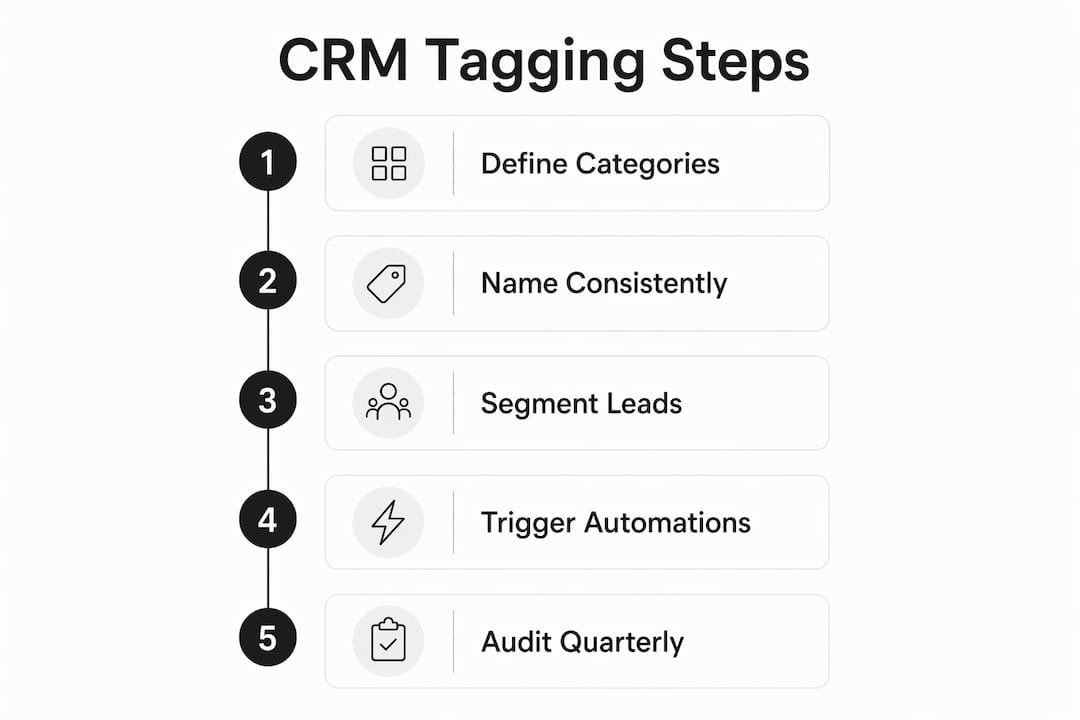
A well-structured tagging system starts with categories, not individual tags. Four to six master categories give your database clarity without complexity. The most effective categories for real estate and luxury sales are Source, Interest or Behavior, Stage or Status, and Engagement. Every tag you create should belong to one of these buckets.
Naming conventions matter more than most agents realize. A lowercase-with-hyphens format like “source-instagram” or “interest-waterfront” prevents duplicate tags from splintering your data. Without a standard, one agent types “Instagram Lead” and another types “instagram-lead,” and now you have two tags doing the same job with half the contacts each.
Tag maintenance is the discipline that separates a functional CRM from a broken one. Quarterly audits that flag and remove tags used by fewer than three contacts keep your database clean and your filters accurate. Schedule it like a listing review. It takes 30 minutes and saves hours of confusion later.
| Well-structured tagging | Poorly structured tagging |
|---|---|
| “source-referral,” “source-instagram” | “Referral,” “Instagram,” “Insta Lead,” “IG” |
| “interest-luxury-condo” | “Luxury,” “Condo Buyer,” “wants condo” |
| “engaged-open-house-march-2026” | “Hot Lead,” “Interested,” “Follow Up” |
| Tags trigger automations and segment lists | Tags exist but serve no workflow purpose |
Pro Tip: Before creating a new tag, ask: “Will this tag trigger an automation or filter a segment?” If the answer is no, you do not need the tag.
How do CRM tags differ from custom fields in real estate?
Tags and custom fields solve different problems. Tags are flexible, temporary labels suited for actions or events, like “attended-open-house-may-2026” or “clicked-waterfront-listing.” Custom fields store structured, permanent data with a single value, like a contract date, a budget range, or a client’s preferred neighborhood.
The practical difference shows up in reporting and automation. A tag can be applied and removed as a client’s behavior changes. A custom field stays fixed until you manually update it. That distinction shapes how you build workflows. You would not tag someone’s job title. You would not use a custom field to track every event they attended.
Here is how to split the two in practice:
- Use tags for: open houses attended, email links clicked, webinar registrations, listing alerts triggered, referral events
- Use custom fields for: buyer budget ceiling, preferred property type, contract anniversary date, agent assigned, lead source category
- Combine both for: a complete client profile where the custom field captures who they are and the tags capture what they have done
Pro Tip: When building a new automation, check whether the trigger is a one-time event or a permanent attribute. Events belong in tags. Attributes belong in custom fields. Getting this right from the start prevents messy data later.
How do CRM tags enhance automation and sales efficiency?
Tags are the most direct trigger mechanism in a CRM automation system. Tags applied to a contact trigger automations immediately, routing them into the right follow-up sequence in real time. A buyer who registers for a waterfront open house gets tagged “engaged-open-house-waterfront,” and that tag fires a personalized follow-up email within minutes, without any manual input from you.

The efficiency gains are concrete. Generating a filtered contact list that once required 20 minutes of manual sorting now takes 30 seconds with tag-based filtering. That is not a minor convenience. For a broker managing 400 active contacts, that time compounds into hours recovered every week.
Tags also improve reporting quality in ways that pipeline stages cannot. A pipeline stage tells you where a deal sits. A tag tells you why. When you can filter by “source-referral” and “interest-luxury-condo” simultaneously, your cohort analysis becomes specific enough to act on. You stop guessing which marketing channel produces your best buyers and start knowing.
The most effective tag-driven workflows in luxury real estate include:
- A “reactivation” sequence that fires when a dormant contact opens three emails in a week
- A routing rule that sends contacts tagged “interest-yacht” to a specialized broker on your team
- A follow-up drip that starts the moment someone is tagged “attended-preview-event”
- A reporting segment that groups all contacts tagged “source-instagram” to measure that channel’s conversion rate
What CRM tagging strategies work best for luxury and real estate sales?
The most effective CRM tagging strategy for real estate starts with lead source segmentation. Knowing whether a contact came from a referral, an Instagram ad, an open house, or a listing portal shapes every message you send them. Tag it at the point of entry and never rely on memory.
Behavior-based tags are where the real power lives. Objective activity tags like “clicked-penthouse-listing” or “attended-webinar-investment-property” tell you what a contact actually did, not what you think they want. Avoid emotion-based tags like “hot lead” or “cold prospect.” Those labels reflect your gut feeling, not the contact’s behavior, and they break down the moment a different agent looks at the record.
Here is a numbered workflow that works for luxury real estate:
- Tag by source at entry. Apply “source-referral,” “source-open-house,” or “source-paid-ad” the moment a contact enters your CRM.
- Tag by property interest. When a contact engages with a specific listing type, apply “interest-waterfront,” “interest-penthouse,” or “interest-investment.”
- Tag by engagement event. Every open house, preview event, or webinar attendance gets its own dated tag: “event-open-house-june-2026.”
- Automate tag application. Connect your website forms, email clicks, and event registrations to your CRM so tags apply without manual entry.
- Review and prune quarterly. Remove tags that no longer serve an active automation or segment.
Pro Tip: Build your tag library before you need it. Sit down with your team and map out every client action that should trigger a follow-up. Then create the tags. Reactive tagging creates inconsistency. Planned tagging creates a system.
A well-tagged database functions as a sales tool, not just a contact list. It lets you identify exactly which clients attended your last preview event, which ones have clicked on waterfront listings three times, and which ones have gone quiet after six months of engagement. That specificity is what separates a power broker’s CRM from a glorified address book.
Key Takeaways
A well-built CRM tagging system is the difference between a database you search and a database that works for you automatically.
| Point | Details |
|---|---|
| Tags vs. custom fields | Use tags for events and behaviors; use custom fields for permanent, structured data like budgets or dates. |
| Four to six master categories | Limit your tag structure to Source, Interest, Stage, and Engagement to maintain clarity and avoid clutter. |
| Naming conventions matter | Use lowercase-with-hyphens consistently to prevent duplicate tags and keep filtering accurate. |
| Tags trigger automations | Apply tags at key contact events to fire real-time follow-up sequences without manual input. |
| Quarterly audits are non-negotiable | Remove tags used by fewer than three contacts every quarter to keep your CRM clean and your reports reliable. |
Why most agents are using tags wrong
I have reviewed a lot of real estate CRMs over the years, and the pattern is almost always the same. Agents start with good intentions, create 40 tags in the first month, and then stop using half of them because nobody can remember what they mean. The database becomes a liability instead of an asset.
The mistake is treating tags as labels instead of triggers. A tag only earns its place if it does something: fires a sequence, filters a segment, or feeds a report. Tags that do not trigger automation or segmentation add noise and actively harm your CRM’s performance. That is not my opinion. That is what happens when your filter returns 200 contacts instead of 12 because the data is polluted.
The agents who get this right treat their tag library like a listing agreement. Every tag has a purpose, a clear name, and a defined action attached to it. They audit it regularly and retire what no longer serves the business. Their CRM tells them who to call today and why. That is the competitive advantage most agents are leaving on the table.
If you are managing luxury clients or high-volume real estate, your CRM tagging strategy is not an admin task. It is a sales decision. Build it with the same intention you bring to a listing presentation.
— Jason
How Plo helps you build a tagging system that actually closes deals
Real estate professionals who want their CRM to work as hard as they do need more than a contact list. They need a system where every tag, every automation, and every follow-up is connected to a real sales outcome.
Plo is built for exactly that. The platform is designed for real estate agents, luxury brokers, and yacht brokers who want their prospecting and sales cycle to run with precision. From top prospecting tools that integrate directly with your CRM to expert-built automation workflows, Plo amplifies the work you are already doing. You bring the relationships. Plo brings the infrastructure to manage them at scale. If you are ready to see what a fully tagged, fully automated pipeline looks like in practice, book a demo and we will show you.
FAQ
What is the role of CRM tags in real estate sales?
CRM tags are flexible labels that categorize contacts by source, behavior, and engagement, enabling automated follow-ups and precise list filtering. They turn a static contact database into an active sales tool that responds to client actions in real time.
How many CRM tags should a real estate agent use?
A well-organized system uses four to six master categories with specific tags nested within each. More tags do not produce more insight; they produce more noise.
What is the difference between a CRM tag and a custom field?
Tags capture events and behaviors that change over time, like “attended-open-house-june-2026.” Custom fields store fixed data points like a buyer’s budget ceiling or contract date. Both belong in a complete client profile, but they serve different functions.
How do CRM tags trigger automations?
When a tag is applied to a contact, it can immediately activate a pre-built automation sequence, such as a follow-up email or a routing rule that assigns the contact to a specific agent. This removes manual steps and speeds up response time.
How often should you audit your CRM tags?
Quarterly audits are the standard recommendation. Remove any tag used by fewer than three contacts, and retire tags that no longer connect to an active automation or reporting segment.