

Time management for sales teams is the discipline of organizing daily activities into focused blocks that protect selling time and eliminate wasted hours. Most sales professionals spend less than 40% of their day in actual revenue-generating activity. The rest disappears into admin, unplanned meetings, and context switching. The Top-Rep Daily Stack framework changes that by structuring every workday into six fixed blocks, each with a clear purpose. Pair that structure with a time audit, automation tools like CRM workflows, and a real-time KPI dashboard, and you have a system that compounds results week over week.
How can sales teams structure their day to maximize selling time?
The Top-Rep Daily Stack divides the workday into six fixed blocks, and structuring the day this way pushes active selling time above 40%. That number matters because most reps hover well below it without a deliberate structure in place.
| Block | Duration | Primary Focus |
|---|---|---|
| Prime | 90 min | Deep prep, strategy, mindset |
| Prep | 60 min | Research, CRM updates, pipeline review |
| Sell AM | 120 min | Outbound calls, demos, live conversations |
| Sell PM | 120 min | Follow-ups, proposals, closing conversations |
| Admin | 90 min | Email, reporting, internal coordination |
| Close-Out | 30 min | Day review, next-day planning |

The two Sell blocks are sacred. No internal meetings, no Slack rabbit holes, no “quick questions” from colleagues. Protecting those 240 minutes of combined selling time is the entire point of the framework.
Time blocking sales tasks outperforms managing a shifting to-do list because calendar holds act as contracts. When your Sell AM block is on the calendar, it carries the same weight as a client meeting. That mental shift alone changes how you and your team treat the time.
Pro Tip: Treat your daily schedule the way you treat a client commitment. If you would not cancel a listing appointment, do not cancel your Sell AM block.
Field sales reps face an additional layer of complexity. Geography-first daily planning with route optimization buffers appointment cancellations and prevents travel time from eating into selling blocks. Plan your territory in clusters, not by appointment time alone.
What methods help sales teams audit and analyze their time usage?
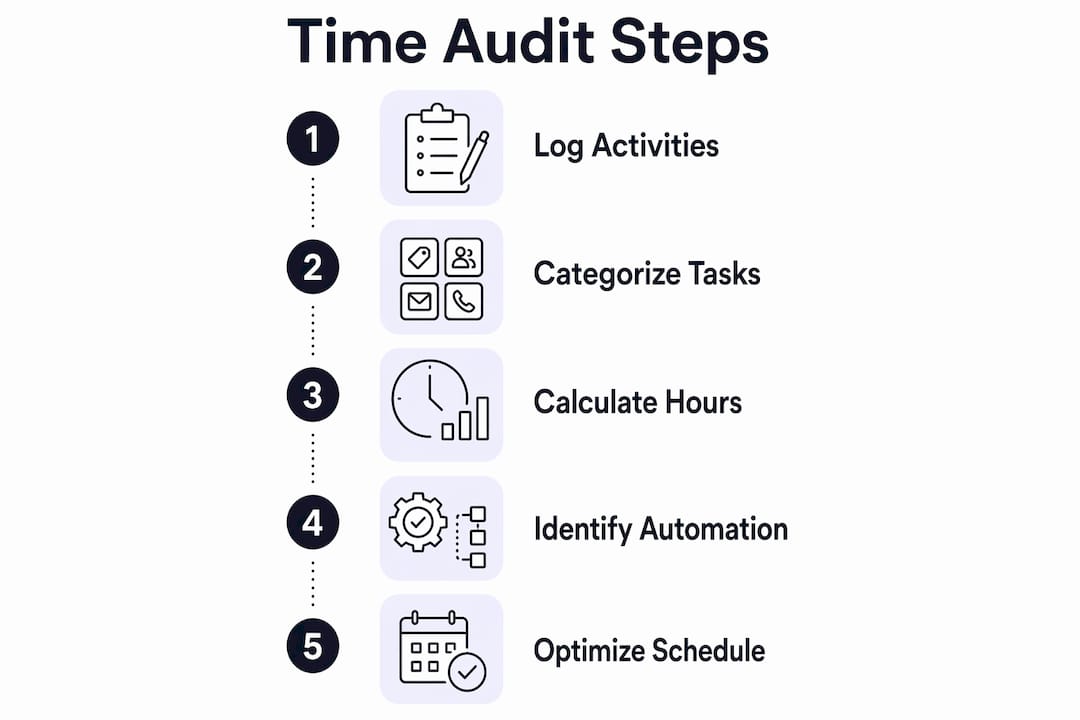
A time audit is the fastest way to see where your hours actually go. Logging activities in 30-minute blocks for one full week produces a clear picture of how time splits across three categories: revenue-generating, administrative, and strategic work.
Most sales professionals are surprised by what they find. A rep who believes they spend five hours a day selling often discovers the real number is closer to two. The audit does not lie, and that discomfort is the point.
| Activity Category | Examples | Automation Potential |
|---|---|---|
| Revenue-generating | Calls, demos, proposals, negotiations | Low |
| Administrative | Data entry, email, scheduling, reporting | High |
| Strategic | Pipeline review, coaching, territory planning | Medium |
Once you categorize a week of activity, calculate the hours in each bucket. Administrative tasks with high automation potential are your first target. Anything that a CRM or scheduling tool can handle should not be on a rep’s plate.
The common obstacle is logging friction. Integrating activity logging directly into existing work steps, rather than treating it as a separate task, reduces rep resistance and produces more accurate data. Build the log into your CRM workflow so it happens automatically, not as an afterthought at the end of the day.
Watch for admin shadow work specifically. These are the small pings, ad-hoc Slack messages, and impromptu hallway meetings that reduce selling focus without appearing on any official calendar. They are invisible time thieves. The audit makes them visible.
- Log every activity in real time, not from memory at day’s end
- Use your CRM’s activity tracking rather than a separate spreadsheet
- Flag any task that repeats more than three times per week as an automation candidate
- Review the audit with your team lead to identify shared inefficiencies
How can sales teams minimize interruptions and manage context switching?
Context switching consumes up to 40% of productive time and requires 23 minutes to regain full focus after an interruption. For a sales rep, that means a single unplanned Slack message during a Sell block can cost nearly half an hour of real output.
The solution is batching. Group similar tasks together and handle them in dedicated windows rather than responding to each one as it arrives. Communication, for example, belongs in specific blocks, not scattered across the entire day.
Human performance research on ultradian rhythms shows that the brain cycles through roughly 90-minute focus periods. The Top-Rep Daily Stack aligns with this biology. Each block is designed to match a natural attention window, which is why the Prime and Sell blocks run at 90 and 120 minutes respectively.
Pro Tip: Use “defensive calendaring” by blocking your Sell AM and Sell PM windows as recurring calendar events visible to your entire team. When colleagues see the block, most will route non-urgent requests to your Admin window instead.
Practical steps to reduce context switching:
- Set email and Slack to check-only during Admin block, not during Sell blocks
- Use a physical or digital “do not disturb” signal during deep work windows
- Batch all outbound calls into one session rather than spreading them through the day
- Schedule internal meetings exclusively in the Admin block or Close-Out window
- Identify your two or three most common self-interruptions and build a rule to contain each one
Self-interruptions are underestimated. Checking a pipeline report mid-call, refreshing email between prospect conversations, or switching to a proposal draft while waiting for a callback all fragment focus. Discipline here is not about willpower. It is about designing an environment where the default behavior is to stay in the current block.
What role does automation and real-time data play in sales time management?
Automation handles the tasks that eat selling time without requiring human judgment. Lead routing, follow-up task creation, demo scheduling, and reminder sequences are all candidates for full automation through a CRM like Salesforce or HubSpot.
The speed argument for automation is compelling. Responding to a demo request within 5 minutes is 21 times more effective at qualifying a lead than the industry average response delay of 42 hours. Automation makes that 5-minute response possible without a rep watching an inbox all day. The role of automation in sales is not to replace the rep. It is to remove every task that stands between the rep and the conversation.
Real-time data closes the loop. A sales dashboard with 8–12 KPIs, separating leading indicators from lagging ones, gives team leaders the visibility to coach proactively rather than reactively. Leading indicators include calls made, demos booked, and proposals sent. Lagging indicators include closed revenue and conversion rates.
| Automation Use Case | Time Saved | Impact |
|---|---|---|
| Lead routing | 30–60 min/day | Faster response, higher show rates |
| Follow-up task creation | 20–40 min/day | No dropped leads |
| Demo scheduling | 15–30 min/day | Above 90% show rate |
| KPI reporting | 30–45 min/day | Proactive coaching enabled |
Daily 5-minute standups paired with weekly 30-minute pipeline reviews create a measurement cadence that keeps the team aligned without consuming selling time. Separating leading from lagging KPIs makes the dashboard something you act on, not just something you report from. That distinction separates teams that improve from teams that just track.
Nurturing real estate leads with automated follow-up sequences is one of the highest-leverage moves a broker or agent can make. The sequence runs while the rep is in a Sell block, meaning no lead goes cold because of a scheduling gap.
Key takeaways
Effective sales time management requires a fixed daily structure, a weekly time audit, and automation handling all tasks that do not require human judgment.
| Point | Details |
|---|---|
| Use the Top-Rep Daily Stack | Six fixed blocks push active selling time above 40% of the workday. |
| Audit your time weekly | Log 30-minute activity blocks for one week to reveal where selling time disappears. |
| Batch tasks to cut context switching | Grouping similar tasks reduces the 40% productivity loss caused by task switching. |
| Automate demo scheduling and follow-ups | Responding within 5 minutes is 21 times more effective than the 42-hour industry average. |
| Track leading and lagging KPIs separately | An 8–12 KPI dashboard with daily standups enables proactive coaching, not just reporting. |
What I have learned from building sales rhythms that actually hold
The hardest part of implementing any time management framework is not the first week. It is week three, when the urgency of a new system fades and old habits start pulling the team back toward reactive mode.
Shared visibility and a disciplined team-wide rhythm outperform individual hacks every time. When one rep has a structured day and the rest of the team does not, the structured rep still gets pulled into ad-hoc requests. The framework only holds when the whole team adopts it together.
The disruptions that threaten Sell blocks are almost never emergencies. They feel urgent because they arrive unexpectedly. Building a simple triage rule, where anything that cannot wait 90 minutes gets escalated to a manager and everything else goes to the Admin block, eliminates 80% of the interruptions without losing a single real emergency.
Balancing flexibility and discipline is a real tension. A rigid schedule that cannot absorb a hot inbound lead is a bad schedule. Build a 15-minute buffer at the start of each Sell block for exactly this reason. The buffer absorbs the unexpected without blowing up the structure.
The teams I have seen improve fastest are the ones that review their agent productivity checklist weekly and coach from real-time metrics rather than end-of-month reports. By the time a monthly report surfaces a problem, the problem has already cost four weeks of revenue.
— Jason
Plo’s tools for real estate sales efficiency
Real estate agents and luxury brokers who apply the frameworks above still need the right tools to make them stick at scale.

Plo builds the prospecting and sales infrastructure that puts these systems into practice. From automated follow-up sequences to pipeline visibility dashboards, the platform is built for agents who want to spend more time selling and less time managing tasks. The top prospecting tools for real estate Plo offers are compared side by side so you can match the right tool to your workflow. If you want to see how automation fits your current sales cycle, the real estate prospecting guide is the right starting point.
FAQ
What is the Top-Rep Daily Stack for sales teams?
The Top-Rep Daily Stack is a six-block daily schedule that structures selling, prep, admin, and review time to push active selling above 40% of the workday. Each block has a fixed duration and a single focus.
How does context switching hurt sales productivity?
Context switching consumes up to 40% of productive time and requires 23 minutes to regain full focus after an interruption, according to American Psychological Association research.
How fast should a sales rep respond to a demo request?
Responding within 5 minutes is 21 times more effective at qualifying a lead than the industry average response delay of 42 hours. Automation makes this response speed achievable without manual monitoring.
What KPIs should a sales team track daily?
A sales dashboard with 8–12 KPIs, separating leading indicators like calls and demos booked from lagging indicators like closed revenue, gives team leaders the data to coach proactively.
How do you conduct a sales time audit?
Log every activity in 30-minute blocks for one full week, then sort each activity into revenue-generating, administrative, or strategic categories to identify where time is lost and what can be automated.