

A working social media approval workflow moves every post through the same named stages, in the same order, with one accountable approver per stage instead of a group chat vote. Most in-house teams need two stages, agencies typically run three, and regulated industries need four or more. Get three things right and the rest takes care of itself: one source of truth for content, one named approver per stage with a backup, and SLAs backed by automated reminders.
TL;DR:
- Teams should assign one specific approver and a backup per stage to ensure accountability and prevent bottlenecks.
- Setting SLAs of 24 hours for internal review and 48 hours for external review helps maintain timely content approval, with adjustments based on content urgency.
- Using centralized platforms for drafts, comments, and asset storage reduces confusion and speeds up the approval process, especially as volume grows.
- Building express lanes and clear rules for urgent content prevents delays during critical or breaking-news posts.
- Automating reminders at assignment, midpoint, and deadline stages significantly reduces manual follow-up and refines workflow efficiency.
Table of Contents
- What Does an Effective Social Media Approval Workflow Look Like?
- How Do You Build and Launch an Approval Process for Social Media?
- Where Should Your Approval Workflow Actually Live?
- How Do You Scale Approval Without Slowing Everything Down?
- Common Approval Workflow Mistakes and How to Fix Them
- A Real Estate Brokerage’s Take on Making Approvals Actually Work
- Let Plo Run Your Approval Workflow While You Focus on Clients
- Sources
- FAQ
What Does an Effective Social Media Approval Workflow Look Like?
The canonical shape hasn’t changed much in the last few years, and there’s a reason it hasn’t: it works. A post moves through Draft → Internal Review → Client/Stakeholder Review → Approved → Scheduled/Published. Each stage has an owner, and each owner has a deadline. That’s the whole architecture. Everything else is enforcement.
Four roles run this system. The creator drafts copy and pulls assets. The reviewer checks brand voice, grammar, and factual accuracy before anything goes further. The approver signs off on strategic and legal fit, the person whose name is actually on the line if a post goes sideways. The publisher schedules or posts once approval clears. On small teams these roles blur into two or three people, but the functions still need to happen in that order, every time.
Here’s where teams get sloppy: naming a “review committee” instead of a person. A social media approval workflow needs one named approver per stage, with a designated backup for vacations and sick days, not a distribution list where everyone assumes someone else will handle it. That single change fixes more bottlenecks than any tool migration.
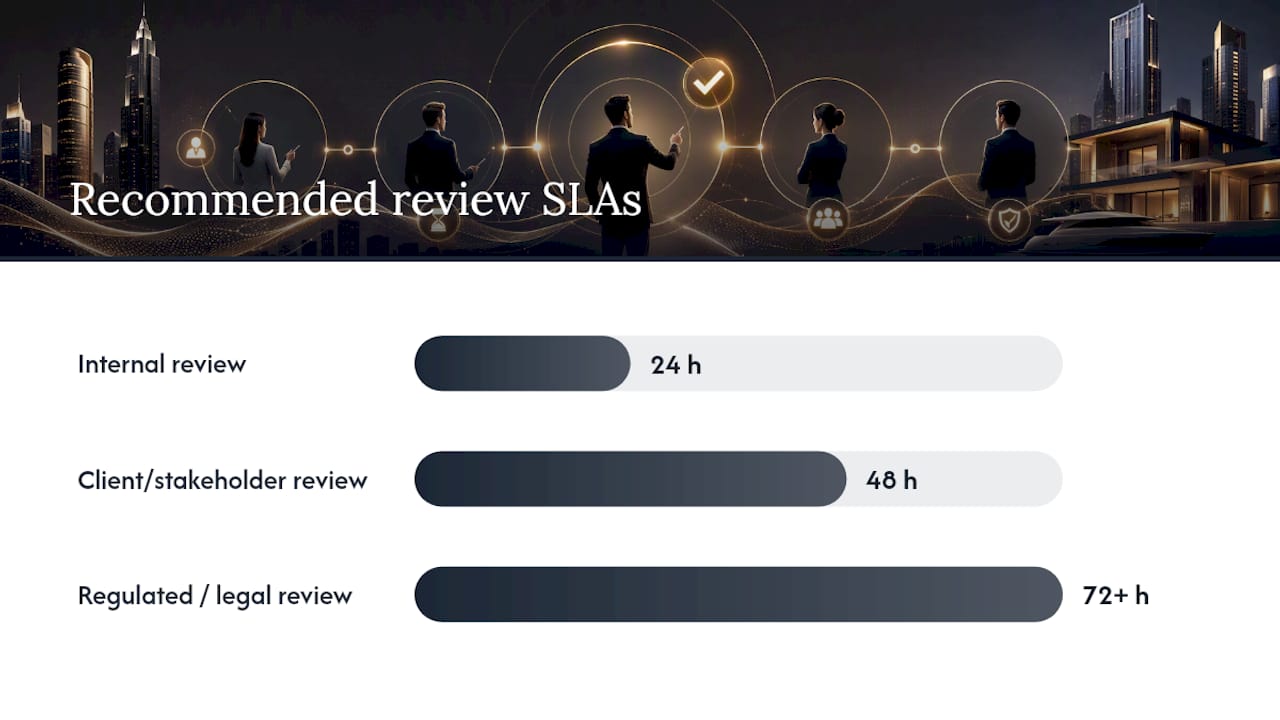
SLA benchmarks worth adopting as your starting point:
- 24 hours for internal review (creator to reviewer)
- 48 hours for client or external stakeholder review
- Shorter SLAs for time-sensitive or reactive content
- Longer SLAs (72 hours or more) for regulated or legal-review content
Pro Tip: Treat your first SLA numbers as a hypothesis, not a rule carved in stone. Run them for three weeks, check where posts actually stall, then adjust. Teams that skip the trial period usually set SLAs too aggressively and end up ignoring them within a month.
Every approval needs a record: who approved it, what version they saw, and the exact timestamp. Without that audit trail, you can’t answer “who signed off on this?” when a post draws complaints, and you can’t prove compliance if a regulator or client ever asks. Teams that centralize approvals typically cut draft-to-live time down toward about 48 hours, compared to the multi-day drift that scattered feedback usually produces.
How Do You Build and Launch an Approval Process for Social Media?
Building this doesn’t require a committee or a six-week rollout. It requires five decisions, made in order, and documented once.
- Map your stages and pick one default path. Resist the urge to build three different flows for three different content types. One default happy path handles the vast majority of posts; exceptions get their own lane later, not their own permanent workflow.
- Assign approvers and backups during onboarding, not during a crisis. Write the names down. If Maria approves Instagram content, who covers when she’s on vacation? Answer that question before the vacation, not during it.
- Set SLAs and configure three automated reminders. One reminder fires at assignment, one at the SLA midpoint, and one when the deadline breaches. This is the single highest-leverage move in the entire process: teams that automate these three touchpoints stop chasing people manually, which is where most of the wasted hours in a slow workflow actually come from.
- Centralize drafts, assets, comments, and version history in one place. If feedback lives in Slack, assets live in Google Drive, and approvals happen over email, you’ve built three separate systems pretending to be one.
- Build express lanes and platform-specific gates. A breaking-news response or a same-day promotion shouldn’t wait behind a queue of routine posts. Express lanes need clear rules and a minimal approver list, defined in advance, so nobody has to improvise under pressure.
Human brains aren’t built for constant task switching. Research from the American Psychological Association shows that repeated context switching slows people down and increases error rates, which is exactly what happens when reviewers bounce between five different apps to approve one post. Fix the tooling and you fix a measurable chunk of the delay.
Where Should Your Approval Workflow Actually Live?
The tool matters less than the principle behind it: one source of truth. The moment drafts live in a doc, comments live in Slack, and final sign-off happens over email, you’ve guaranteed confusion. Someone approves an old version. Someone else never sees the final asset. Nobody can reconstruct who said yes to what.
Whatever system you choose, whether it’s a dedicated platform or a well-disciplined board, test it against this checklist:
- Visible status for every post (draft, in review, approved, scheduled)
- Post preview that shows exactly what will publish, not a text summary
- Role-based permissions so reviewers can comment but only approvers can approve
- In-context comments attached to the specific asset or line, not a separate thread
- Timestamped, versioned approval records
- Automated reminder triggers tied to your SLAs
- Visual SLA flags for anything approaching or past deadline
- Native asset attachments (images, video, captions) in one card or ticket
| Team size or type | Minimum viable setup |
|---|---|
| Solo marketer or two-person team | A shared board (Trello, Asana, or similar) with a strict “one card, one approver, no exceptions” rule |
| Small agency managing multiple clients | A scheduler with built-in approval stages and client-facing review links |
| Enterprise or regulated team | A platform with role-based access, audit logging, and routing rules by content risk |
A spreadsheet and a group chat can work for a two-person team with discipline. They fall apart the moment a third client or a compliance requirement enters the picture, because nothing enforces the rules once volume climbs.
How Do You Scale Approval Without Slowing Everything Down?
Growth breaks flat approval processes fast. The fix isn’t more approvers, it’s smarter routing. Enterprise workflows treat approval as a governance question, not a single queue everyone dumps posts into.
Proportional review means the depth of scrutiny matches the risk of the post, not a blanket rule applied to everything:
- Routine posts (behind-the-scenes, listing updates, event photos): one reviewer, fast turnaround
- Product or service claims: reviewer plus a subject-matter approver
- Regulated content (financial, health, legal disclaimers): compliance review added as a required stage
- Executive or crisis communications: senior leadership sign-off, often serial rather than parallel
Parallel review, where multiple people review simultaneously, works for routine content and cuts turnaround time. Serial review, where each approver sees the version the last one touched, matters when legal or compliance needs to see the final, fully-vetted version rather than a draft in progress. Pre-approved evergreen content banks also save real time. If a caption template already cleared legal once, it shouldn’t need to clear again every time it’s reused with a new image.
Common Approval Workflow Mistakes and How to Fix Them
Most slow workflows fail for the same handful of reasons, and none of them require a new tool to fix.
- No SLAs at all. Posts sit for days because nobody agreed on a deadline. Fix: set 24-hour internal and 48-hour client SLAs today, in writing.
- Too many approvers. Five people weighing in guarantees five different opinions and zero accountability. Fix: cut to one final approver per stage.
- Feedback scattered across email, Slack, and text messages. Fix: centralize comments in the same place as the asset.
- Approving captions but forgetting the actual image or video. Fix: require sign-off on the full post preview, not just copy.
- No express lane for urgent posts. Fix: define one now, before you need it during a crisis.
Run a 15-minute weekly review checking four things: current bottlenecks, missed SLAs, the same approver name showing up as the delay repeatedly, and platform-specific slowdowns (LinkedIn approvals often lag behind Instagram, for instance, simply because fewer people check that queue).
A Real Estate Brokerage’s Take on Making Approvals Actually Work
Plo builds prospecting and marketing systems for real estate agents and brokers, and approval bottlenecks show up constantly in that world. A typical brokerage workflow runs three stages: agent drafts, broker reviews for compliance and brand fit, marketing schedules. Evergreen listing templates get pre-approved once, which lets agents post routine updates without waiting on anyone. Managed onboarding removes the setup guesswork and keeps SLAs enforced instead of ignored.
— Jason
Let Plo Run Your Approval Workflow While You Focus on Clients
Building and policing an approval workflow takes real hours, and most agents and brokers don’t have a spare afternoon to map stages and chase reviewers. Plo’s marketing suite gives real estate agents, yacht brokers, and luxury sales teams a managed system where onboarding sets up your approval stages, SLAs, and reminders from day one, so posts stop stalling in someone’s inbox.
For teams that want the workflow built and run for them rather than assembled from scratch, the Marketing suite runs $445 per month, and a dedicated Marketing manager service is available at $1,000 per month for teams that want a person, not just software, owning the queue. If lead flow is the bigger bottleneck, pair it with lead generation built for real estate and luxury brokers. Check current pricing and packages on the pricing page or book a demo to see the approval setup in action before you commit to anything.
Sources
- Social Media Approval Workflow: The Complete Guide + Free Checklist
- How to Build a Social Media Approval Workflow in 2026 | Privly
- Enterprise Social Media Approval Workflow: A Guide – Apaya
- American Psychological Association — research on multitasking
FAQ
What is the 5-3-1 rule for social media?
The 5-3-1 rule is a content-mix guideline suggesting five curated posts, three original posts, and one promotional post within a given posting cycle, though exact definitions vary by source.
What is the 5:3:2 rule for social media posts?
Definitions of the 5:3:2 rule vary across marketing sources, but it generally describes a content-mix ratio balancing curated, original, and promotional posts rather than a formal approval standard.
How do I create an approval workflow for social media?
Map your stages (typically Draft, Internal Review, Client Review, Approved, Scheduled), name one approver per stage with a backup, set SLAs like 24 hours internal and 48 hours client, and centralize drafts and feedback in one workspace.
How many approval stages should a small team use?
Most in-house teams only need two stages (draft and final approval), while agencies typically add a client review stage, and regulated industries often require four or more, including compliance sign-off.
What does Plo charge for managed social media approval workflows?
Plo’s Marketing suite is $445 per month, and a dedicated Marketing manager service runs $1,000 per month; full current pricing is listed on the pricing page.





