

Yes, run Google Ads, but run it as a system, not a single campaign. Start with Search plus Local Services Ads (if you’re eligible) and only after you have a focused landing page, a CRM ready to catch and follow up on leads fast, and a starter budget of roughly $900 to $2,500 a month. Expect cost per lead to stabilize over a few months of campaign optimization rather than immediately.
TL;DR:
- Focus on combining Search and Local Services Ads with a dedicated landing page, a CRM, and a monthly budget of at least $900 to $2,500 for effective results.
- Prioritize highly targeted long-tail keywords and regularly review search terms to keep ad spend efficient and eliminate irrelevant clicks.
- Use clear, specific landing pages with single offers, trust signals, and minimal navigation to maximize conversion rates.
- Emphasize quick lead follow-up within minutes, and establish a routine of daily, weekly, and monthly optimizations to improve campaign performance.
- Ensure compliance with Google’s real estate advertising policies by accurately representing properties, avoiding discriminatory language, and substantiating claims.
Table of Contents
- What Google Ads campaign types work best for real estate?
- How do you set up a Google Ads search campaign for real estate?
- Which keywords and negative keywords protect your ad budget?
- What makes a real estate landing page actually convert?
- How much should real estate agents budget for Google Ads?
- What’s the right optimization routine for real estate PPC?
- Who’s behind this playbook and how does ex.plo.re fit in?
- Do real estate Google Ads have to follow special compliance rules?
- An agent-first take on running Google Ads profitably
- Let ex.plo.re manage the campaign while you manage the clients
- Sources
What Google Ads campaign types work best for real estate?
Not every campaign type earns the same job. Match the format to the intent behind the click, and you’ll stop wasting spend on traffic that was never going to become a client.
Search campaigns are the backbone for most agents. They catch people typing “homes for sale in [neighborhood]” or “sell my house fast [city],” which is about as high-intent as digital advertising gets. Google’s dominance in search share is exactly why this channel deserves first dollar priority; it commands the overwhelming majority of mobile search queries in the United States.
Local Services Ads (LSAs) work on a pay-per-lead model rather than pay-per-click, and they display a Google-verified trust badge next to your listing. That badge does real work in a category where buyers and sellers are nervous about who they’re trusting with a six-figure decision. LSAs are frequently recommended as a starting channel precisely because you’re not paying for browsers, only for people who reach out.
Performance Max (PMax) wants data before it can perform. Accounts generating fewer than about 30 conversions a month typically get more control and predictability from Search first, since PMax needs volume to optimize well. It becomes genuinely useful for luxury listings once your base Search campaigns and conversion tracking have already proven stable, especially when you have strong photography or video assets to feed the algorithm.
Display and remarketing aren’t lead generators on their own. Real estate is a long sales cycle, often six to eighteen months from first search to signed contract, so remarketing keeps your name in front of someone who visited your listing page but wasn’t ready to call.
- Search: buyer and seller keyword intent, paired with neighborhood-specific landing pages
- LSAs: local trust and pay-per-lead simplicity for agents who want fewer moving parts
- PMax: luxury inventory with strong creative, once conversion data exists
- Display/remarketing: staying visible to warm traffic during a long decision window
How do you set up a Google Ads search campaign for real estate?
Building the campaign correctly the first time saves you weeks of cleanup later. Follow this order.
- Choose Expert Mode and the Leads objective. Skip the Smart guided setup. Expert Mode gives you the controls you’ll need for geo-targeting, negative keywords, and bidding strategy.
- Select Search as the campaign type, not Performance Max, for your first campaign. You need clean data before you hand control to an automated format.
- Set tight geo-targeting. Target the specific ZIP codes or neighborhoods you actually serve, and exclude areas outside your license or comfort zone. A five-mile radius around your farm area usually beats a whole metro.
- Build ad groups by neighborhood and intent, not by generic terms. A “Riverside Buyers” ad group and a “Riverside Sellers” ad group behave completely differently once you look at conversion data.
- Write responsive search ads that mirror the landing page exactly. If the ad promises a home valuation, the landing page better open with a home valuation tool, not your bio.
- Set up conversion actions before you launch, tracking both form fills and phone calls, following the official conversion tracking setup steps in Google Ads.
- Start bidding with Maximize Clicks or manual CPC for the first two to three weeks, then shift toward Target CPA once you have enough conversion history to guide it.
- Enable call tracking so every phone lead gets attributed back to the keyword and ad group that generated it.
Pro Tip: Build separate campaigns for buyer intent and seller intent from day one. Seller leads generally justify a higher bid because they turn into listings with far greater lifetime value than a single buyer transaction.
Which keywords and negative keywords protect your ad budget?
Generic real estate keywords are expensive and vague. “Homes for sale” might cost you $8 a click and attract half the country. Long-tail, neighborhood-plus-intent phrases cost less and convert better because they filter for people who already know what and where they want.
Buyer-side templates that tend to work: “3 bedroom homes for sale [neighborhood],” “new construction homes [city],” “condos under $[price] [area].” Seller-side templates: “sell my house fast [city],” “home value estimate [neighborhood],” “cash offer for my house [area].”
Use phrase match and exact match for the bulk of your budget to keep control tight. Broad match can extend reach, but only pair it with an aggressive negative keyword list and close weekly monitoring, since it’s the fastest way to blow through a monthly budget on irrelevant clicks.
- Negative keywords to add immediately: “jobs,” “salary,” “for rent,” “apartment,” “free,” “how to become a realtor”
- Review the Search Terms report weekly, not monthly. That single habit does more to protect budget than almost anything else in the account, since negative keyword hygiene is the highest-leverage weekly task in real estate PPC.
- In high-cost metro markets, narrow further with hyper-specific neighborhood phrases and add qualifying fields to your form, since a smaller volume of well-qualified leads beats a flood of weak ones.
What makes a real estate landing page actually convert?
Sending a paid click to your homepage is one of the most common ways agents waste a media budget. Homepages try to do everything and end up converting nobody. A dedicated landing page with a single offer built for that exact ad consistently outperforms a general site.
A landing page that earns its ad spend has a few non-negotiable elements:
- A headline that repeats the ad’s exact promise (home valuation, listing alerts, buyer’s guide)
- One call to action, not three competing buttons
- Minimal navigation, so there’s nowhere else to click but the form
- Trust signals: reviews, recent sales, licensing information, a real photo of you
On the tracking side, set up conversion actions for both form submissions and phone calls inside Google Ads, and layer in Google Tag Manager if you want more granular event tracking without touching code every time. Then push those conversions into your CRM. Feeding real conversion outcomes back into the account improves how Smart Bidding optimizes over time, because the algorithm starts learning which leads actually became clients, not just which ones filled out a form. A tool like Plo’s local client acquisition workflow can handle that CRM handoff automatically.
Pro Tip: Keep your form to three fields: name, phone, and the one detail that matters (budget range or address). Every extra field you add measurably lowers your conversion rate.
How much should real estate agents budget for Google Ads?
Most agents starting out land somewhere between $900 and $2,500 a month, which is enough spend to generate the data Google’s algorithm needs to start optimizing. Below that range, you’re often paying for the platform’s learning phase without ever collecting enough conversions to judge performance fairly.
Real estate PPC benchmarks vary by market, but agents should plan around a meaningful cost per click and factor that into a realistic cost per lead target before judging a campaign’s success, based on the CPC, CTR, and conversion-rate benchmarks commonly cited across the industry.
Give it time before pulling the plug. By day 7, you’ll see clicks and maybe your first few leads. By day 30, you should have enough conversion data to spot which ad groups and keywords are pulling weight. By day 90, cost per lead should be settling into a predictable range, and that’s your real signal for whether to scale the budget or fix the funnel.
What’s the right optimization routine for real estate PPC?
Campaigns don’t run themselves, and the agents who treat Google Ads as “set it and forget it” are the ones who quit after burning through a budget with nothing to show for it. Build a routine and stick to it.
- Daily: respond to every lead within minutes, not hours, since speed to lead is one of the biggest levers on close rate. Also glance at daily spend to catch any runaway campaigns early.
- Weekly: pull the Search Terms report, add negatives, and compare your top three ad variations against the rest.
- Monthly: reallocate budget toward the campaigns producing the lowest cost per lead, and kill or rework anything that isn’t.
- Test relentlessly: try new headlines, shorter forms, and different CTAs (Get My Home Value vs. See New Listings First). Prioritize tests on your highest-traffic ad groups first, since that’s where a small lift compounds fastest.
- Shift bidding strategy to Target CPA once you have consistent conversion volume, and only layer in Performance Max after Search has proven stable.
Who’s behind this playbook and how does ex.plo.re fit in?
This guide is written by Jason, whose editorial work focuses on the tools and workflows real estate agents and brokers actually use to generate and manage leads, drawing on the same industry benchmarks and platform documentation cited throughout this piece.
Most agents don’t fail at Google Ads because of a bad campaign. They fail because nobody follows up on the lead within the hour it arrives, and the CRM never talks to the ad account in the first place.
Plo was built around that exact gap. It connects lead capture, CRM follow-up, and managed campaign reporting into one workflow, so a lead from a Search ad doesn’t sit in an inbox for two days before someone calls. For agents comparing tools to manage that handoff, Plo’s lead generation tools for brokers roundup breaks down where automation fits into an existing sales process without replacing the agent’s personal touch.
Do real estate Google Ads have to follow special compliance rules?
Google enforces its Real Estate Services policy on top of its general advertising policies, and violations get ads disapproved or accounts suspended, so this isn’t a section to skip. Your ads and landing pages need to represent properties accurately, avoid discriminatory language tied to protected classes, and steer clear of fair housing violations in both copy and audience targeting choices.

Avoid language that implies preference based on family status, national origin, religion, or similar categories, since fair housing rules apply to digital ads exactly as they apply to print. That also means being careful with audience exclusion settings: using Google’s demographic targeting to exclude age groups or other protected categories from seeing your housing ads can put you in violation even if you never meant it that way.
Property claims also need to be accurate and substantiated. If your ad says “3 bedroom, 2 bath, $450K,” the listing needs to match, and pricing needs to reflect current, real terms rather than a bait price you plan to walk back after the click. Google’s policy team does review flagged accounts, and disapprovals tend to cluster around vague or exaggerated property claims and audience exclusions that read as discriminatory, even when unintentional. Building compliance into your ad copy and targeting from the start avoids the account suspension headache that can knock out lead flow for weeks while you appeal.
An agent-first take on running Google Ads profitably
Most advice on this topic treats Google Ads like a keyword problem. It isn’t. The keyword list matters, but it’s the smallest lever in the system. The real difference between agents who make Google Ads profitable and agents who abandon it after two months comes down to what happens in the sixty seconds after someone submits a form.
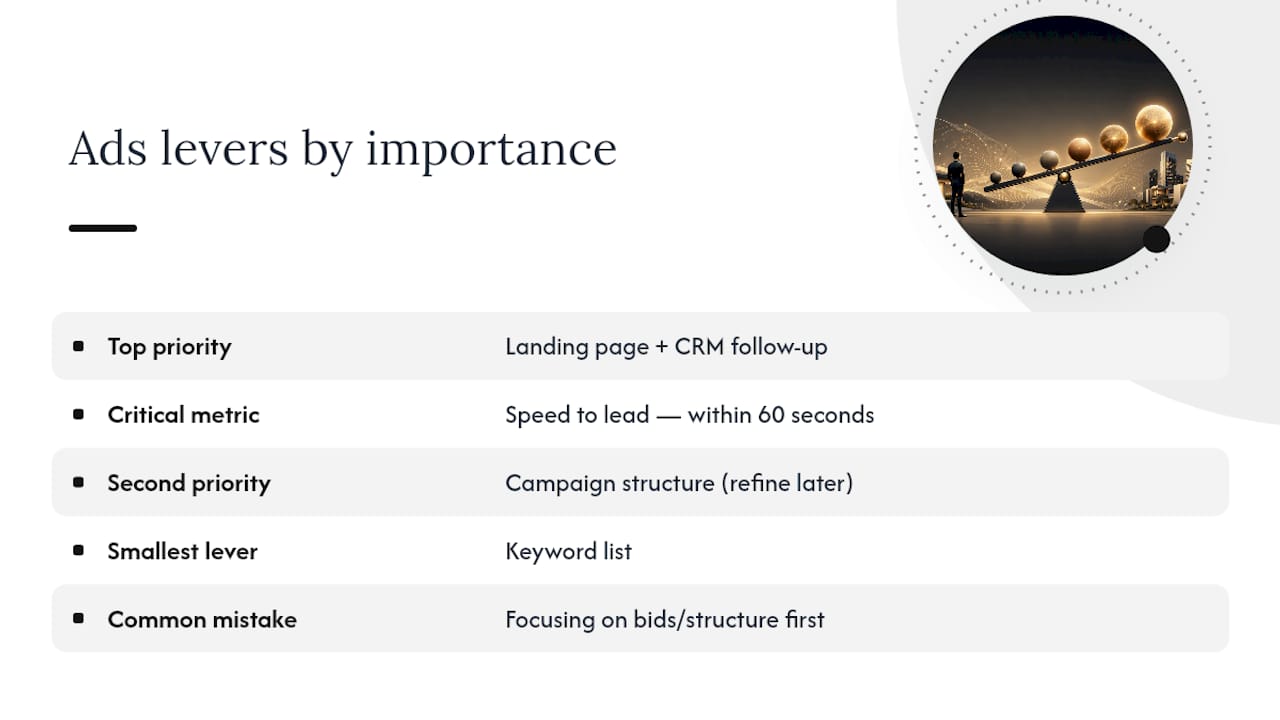
Conventional guidance spends most of its energy on campaign structure and barely touches speed to lead or CRM follow-up, which is backwards given how much those two factors actually move the needle on conversion. A perfectly built Search campaign feeding a slow, disconnected follow-up process is still a losing campaign. It just fails quietly, three months in, once the agent gives up and blames the ads.
If you’re prioritizing anything first, prioritize the landing page and the follow-up workflow before you touch a bid strategy. Get those two right, and even an imperfect campaign structure will produce usable leads while you refine the rest.
— Jason
Let ex.plo.re manage the campaign while you manage the clients
Running Search, LSAs, and remarketing as one coordinated system, while also staying on top of daily lead response and weekly search term reviews, is a lot to carry alongside actual client work. Plo handles the managed campaign side (setup, conversion tracking, and reporting) while routing every lead straight into a CRM built for real estate follow-up, so nothing sits unanswered while you’re at a showing.

If you want a second set of eyes on your account structure or you’re starting from zero, book a demo call and walk through how Plo’s managed Google Ads and CRM integration would look for your market and budget. For agents who’d rather explore the toolset first, the top prospecting tools for real estate page breaks down what’s included before you commit to anything.
Sources
- Google Ads for Real Estate Agents: The 2026 Guide | Krista Mashore
- Google Ads for Real Estate Agents | WordStream
- Set up conversion tracking for Google Ads – Google Support
- Real Estate Google Ads Lead Generation in 2026: How Realtors Win with PPC | LeadsuiteNow