

A client nurturing workflow is an automated, segmented communication sequence that moves leads from initial contact to sales-ready status through personalized, behavior-triggered touchpoints. In real estate and luxury brokerage, where the average sales cycle spans months and relationships drive everything, a well-built nurture system is the difference between a pipeline that converts and one that quietly goes cold. Platforms like HubSpot, ActiveCampaign, and Vedain CRM each offer the infrastructure to run these sequences at scale. The goal is not to automate your personality out of the process. It is to make sure no qualified lead ever falls through the cracks because you were busy closing someone else.
What makes a client nurturing workflow actually work?
The foundation of any effective nurture system is segmentation. Leads from different sources carry different intent signals, and sending the same message to a cold referral and a warm inbound inquiry is a fast way to lose both. Segment by source (paid ad, referral, open house), by property interest (luxury residential, commercial, yacht), and by behavioral signals like pages visited or forms submitted.
Beyond segmentation, you need three structural elements before you write a single email:
- Enrollment triggers: The specific action that starts the sequence. A form submission, a demo booking, a property alert registration at a platform like HOSO Real Estate, or a direct inquiry all qualify. Define each trigger explicitly in your CRM so leads never enter the wrong track.
- Exit conditions: The rules that stop the sequence. A reply from the lead, an unsubscribe, a meeting booked, or reaching a MQL score threshold like 50 points should all trigger immediate unenrollment. Continuing to send automated messages after a lead has engaged is one of the most damaging mistakes in client relationship management.
- Branching logic: Behavior-based forks in the sequence. If a lead opens your case study email and clicks through to a property listing, that is a stronger signal than a non-open. Your workflow should route those two leads differently from that point forward.
CRM integration is not optional here. HubSpot and Vedain both support contact-based automations that update in real time based on lead behavior. Without that integration, you are running a static drip, not a true nurture workflow.
Pro Tip: Use lead scoring to define your sales handoff precisely. Assign point values to actions like email opens (1 point), link clicks (3 points), and property page visits (5 points). When a lead crosses 50 points, route them to sales automatically. This removes guesswork from the MQL to SQL handoff and keeps your pipeline clean.

How to design and execute your nurture sequence step by step
Building the sequence itself requires a skeleton before you write any content. Map out every touchpoint by day, channel, and purpose before you open your email editor.
- Day 0: Welcome message. Send immediately on enrollment. This is not a thank-you note. It is a value delivery. Tell the lead exactly what they will receive, why it matters to them, and what to do next. A strong welcome sequence in B2B and service industries typically runs 3 to 5 emails over 7 to 14 days, starting with immediate value rather than pleasantries.
- Day 2: Multi-channel follow-up. Send a WhatsApp or SMS message referencing the welcome email. Multi-channel outreach at this stage increases reply rates significantly because it meets leads where they actually spend time. Keep it short and personal.
- Day 5: Pain-point content. Send a case study or market insight email tied directly to the lead’s stated interest. A luxury buyer in Spain’s Costa del Sol market, for example, responds to content about international property trends differently than a local residential buyer. Map your content to the specific pain point, not to a generic category.
- Day 10: Sales task trigger. Create an automated task in your CRM assigning a personal call or personalized video message to the sales rep. This is where automation hands off to human judgment.
- Day 14: Re-engagement check. If the lead has not replied or clicked anything, send a direct re-engagement message. Keep it honest. “I want to make sure I’m sending you the right content” outperforms any clever subject line at this stage.
Set up branching logic at each step. A lead who clicks the Day 5 case study link should enter a faster track with a more direct CTA. A lead who has not opened anything by Day 10 should receive a simplified, plain-text message before the re-engagement email. Behavior-based branching in HubSpot, for instance, uses email open and click signals to fork sequences automatically, keeping your workflow efficient without manual intervention.
Pro Tip: Cadence is not one-size-fits-all. A luxury yacht buyer with a 6-month decision cycle needs monthly touches after the initial sequence, not weekly emails. Adjust frequency per segment to protect your unsubscribe rate and maintain the relationship over the long term.
How do you measure and optimize a nurture workflow?
Measurement starts with three metrics that tell you whether your workflow is healthy or broken:
- Unsubscribe rate: Below 0.5% per email is the benchmark. Anything above that signals a content or frequency mismatch. If your Day 5 email consistently triggers unsubscribes, the content is either irrelevant or arriving too soon.
- Reply rate: The strongest engagement signal in any nurture sequence. A reply means the lead is ready for a human conversation. Your automation must detect this and stop all further sends immediately. Continuing automated messages after a reply creates a poor impression that is very hard to recover from.
- Conversion to MQL: The percentage of enrolled leads who reach your qualification threshold. This tells you whether your content is actually moving leads forward or just filling their inbox.
Troubleshooting falls into two categories. Over-nurturing shows up as high unsubscribes and low reply rates. The fix is reducing frequency and improving content specificity. Under-nurturing shows up as leads going cold before reaching MQL status. The fix is adding touchpoints at the right lifecycle stage and using multiple nurture tracks rather than a single linear sequence.
Treating your workflow as a set of lifecycle orchestration tracks, such as a welcome track, an active MQL track, and a re-engagement track, prevents the single-cadence problem that kills most nurture programs. Each track has its own timing, content, and exit logic.
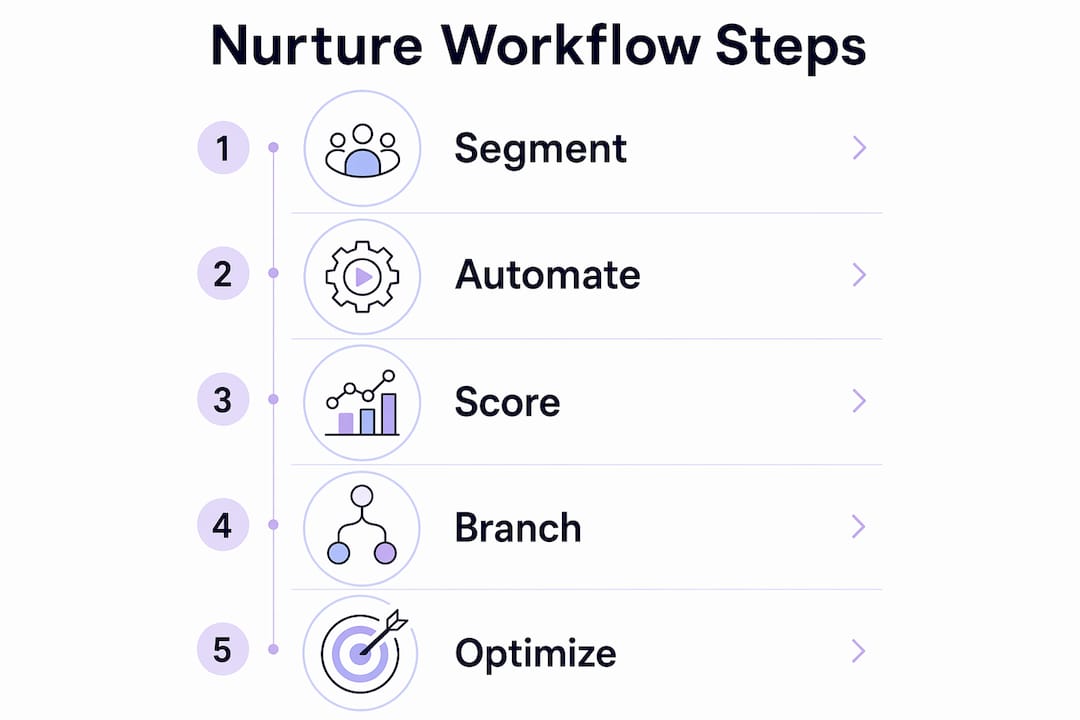
Pro Tip: Run A/B tests on subject lines and send times before you optimize content. Most brokers jump straight to rewriting emails when the real issue is that their messages arrive on Friday afternoons. Test the mechanics first, then the message.
What do the best nurture workflow tools actually offer?
The platform you choose shapes what your workflow can do. Here is a direct comparison of the three most relevant tools for sales teams and brokers:
| Platform | Best for | Key automation feature | Limitation |
|---|---|---|---|
| HubSpot | Inbound B2B and real estate teams | Contact-based workflows with goal-state unenrollment | Higher cost at scale |
| ActiveCampaign | Multi-channel sequences with deep tagging | SMS, email, and site tracking in one flow | Steeper learning curve |
| Vedain CRM | Brokers needing CRM-native nurture | Timed cadences with branching and reply detection | Smaller integration ecosystem |
For real estate specifically, the email nurture sequences that perform best combine automated touchpoints with manual tasks assigned to agents at key decision points. The automation handles timing and delivery. The agent handles the conversation.
A practical welcome sequence for a luxury real estate lead looks like this: immediate value email with a market report, Day 3 WhatsApp message with a property shortlist, Day 7 case study of a recent transaction, Day 12 personal call task for the agent, and Day 18 re-engagement email if no response. This structure builds trust without overwhelming the lead.
For nurturing real estate leads in competitive local markets, the same logic applies with tighter timing. Local buyers move faster and expect faster responses. Your workflow should reflect that.
Pro Tip: Reply detection is non-negotiable regardless of which platform you use. Every tool listed above supports it. If yours does not, that is the first thing to fix before you build anything else.
Key takeaways
A client nurturing workflow succeeds when segmentation, behavior-based branching, and hard exit conditions work together to move leads forward without wasting a single automated send.
| Point | Details |
|---|---|
| Segment before you automate | Divide leads by source, intent, and behavior before building any sequence. |
| Define exit conditions first | Reply detection and MQL thresholds must be set before enrollment begins. |
| Use multiple lifecycle tracks | Welcome, active MQL, and re-engagement tracks outperform single linear drips. |
| Benchmark unsubscribe rate | Keep it below 0.5% per email; higher rates signal content or frequency problems. |
| Automate handoff, not the conversation | Use automation to route qualified leads to sales, then let humans take over. |
What I’ve learned about nurture workflows after years in the field
Here is the uncomfortable truth most automation guides skip: the biggest risk in a nurture workflow is not that it fails. It is that it works just well enough to make you complacent.
I have seen brokers build a 10-step sequence, watch their reply rate tick up slightly, and then leave that workflow untouched for 18 months. The market shifts. Buyer concerns change. The content that resonated in early 2025 feels tone-deaf by mid-2026. Meanwhile, the automation keeps firing, and the unsubscribe rate creeps up so slowly that nobody notices until the list is half the size it was.
The other pattern I see constantly is the handoff gap. Marketing builds a beautiful nurture sequence that qualifies leads to MQL status, and then sales gets a notification and does nothing with it for three days. Real-time qualification signals must trigger sales routing immediately, not at the end of a sequence. A lead who just clicked your pricing page and visited your contact form is ready right now. Waiting 48 hours to follow up is not a workflow problem. It is a sales alignment problem that no automation can fix on its own.
My honest recommendation: treat your workflow as a living system. Review it quarterly. Pull the reply rate and unsubscribe rate for every active sequence. Kill what is not working. Refine what is. The brokers who do this consistently outperform those who set it and forget it, every single time.
— Jason
How Plo helps you build workflows that actually convert
Plo is built for brokers who want to control their pipeline without drowning in manual follow-up. The tools inside Plo’s platform are designed around the real estate and luxury brokerage sales cycle, not generic B2B templates.
If you are ready to put a real system behind your prospecting, Plo’s follow-up workflow for brokers gives you a structured, conversion-focused starting point built specifically for high-value client acquisition. You can also explore the local client acquisition workflow to see how top agents in competitive markets are running their nurture sequences today. The pipeline does not build itself. But with the right system behind you, it comes close.
FAQ
What is a client nurturing workflow?
A client nurturing workflow is an automated sequence of communications that guides leads through defined stages toward a sales-ready state using segmentation, behavior triggers, and clear exit conditions. It replaces manual follow-up with a system that responds to lead actions in real time.
How many emails should a nurture sequence include?
Most effective B2B and real estate nurture sequences use 3 to 5 emails over 7 to 14 days for the initial welcome track, followed by less frequent touches for leads who do not convert immediately. Cadence should match the lead’s decision timeline and lifecycle stage.
When should automation stop and a human take over?
Automation should stop the moment a lead replies, books a meeting, or reaches your MQL score threshold. Continuing automated sends after a lead engages creates a poor experience and signals that your system is not paying attention.
What unsubscribe rate signals a problem in my workflow?
An unsubscribe rate above 0.5% per email indicates a content or frequency mismatch. Review the specific email triggering the exits and test a revised version with a smaller segment before rolling out changes to the full sequence.
Which CRM is best for real estate nurture workflows?
HubSpot suits inbound-heavy teams with complex branching needs, while Vedain CRM works well for brokers who want CRM-native automation with reply detection built in. ActiveCampaign is the strongest option for multi-channel sequences that combine email, SMS, and site tracking in a single flow.