
Overview: The highest-impact follow-up system runs 3–5 purposeful touches, each adding genuine value, with a single named owner in your CRM and a confirmed next step before every meeting ends. That one structural decision, ownership plus cadence, separates the brokers and sales teams who consistently close from the ones who lose deals to silence.
Your 24-hour quick-action checklist:
- Assign one owner to every open deal in your CRM before end of day.
- Send a same-day recap email within two hours of your last meeting or call.
- Schedule your next three follow-up touches now, with a template attached to each task.
Every reliable follow-up system needs four core pieces:
- A defined cadence (specific days and channels for each touch)
- A single named owner per client relationship
- One clear ask per message
- Logged tasks in your CRM so nothing disappears
Pro Tip: Before you leave any client meeting, confirm the next step out loud and put it in the calendar. That one habit eliminates most follow-up anxiety before it starts.
Key Takeaways
A follow-up system built on ownership, cadence, and value in every touch is the single most reliable way to close more deals, recover more invoices, and retain more clients over time.
| Point | Details |
|---|---|
| Assign one owner per deal | Shared ownership means no one follows up; name one person per client per stage in your CRM. |
| Use 3–5 purposeful touches | Most deals close between the second and fourth contact, not the first; each touch must add value. |
| Send the same-day recap | A recap within two hours of any meeting reduces misunderstandings and sets the tone for the relationship. |
| Automate tasks, not conversations | Let your CRM create reminders and tasks; keep phone calls, negotiations, and breakup emails manual. |
| Plo for broker follow-up | Plo’s CRM automation and template library help brokers run consistent post-walkthrough sequences from day one. |
Table of Contents
- Why client follow-up best practices actually move the needle
- How to design a follow-up system that runs itself
- What to send in the first 48 hours after any meeting
- Cadences and sequences for every common scenario
- Choosing the right channel and personalizing at scale
- What to automate in your CRM and what to keep human
- KPIs to track for follow-up effectiveness
- Ready-to-use follow-up templates: your swipe file
- Common pitfalls that kill follow-up effectiveness
- How to scale follow-up across your team without losing the human touch
- Step-by-step follow-up workflow for brokers after a client walkthrough
- The mindset shift that changes everything about follow-up
- Plo helps you build and run this system from day one
- Sources
Why client follow-up best practices actually move the needle
A follow-up system is a documented, repeatable process that tells your team who contacts a client, through which channel, on which day, and with what message, at every stage of the sales cycle. Without that structure, follow-up becomes a personal habit that varies by rep and evaporates under pressure.
The business case is straightforward. Most deals require multiple touches to close, with only a small percentage of sales happening on first contact. That means the team with the better system, not the better pitch, wins the majority of deals. Consistent follow-up also accelerates payment collection, reduces client churn, and generates referrals from clients who feel genuinely attended to.
Three operational pillars hold a system together:
- Ownership: Every client has one named person responsible for the next touch. Shared ownership is no ownership.
- Cadence: Specific timing rules (Day 1, Day 3, Day 7) replace vague intentions like “follow up soon.”
- Value: Each message gives the client a reason to reply, not just a reason to feel chased.
When all three are in place, follow-up becomes an operational habit rather than an improvised activity. The practical payoff shows up in close rates, payment speed, and the number of clients who refer others without being asked. You can read more about why client follow-up drives more sales and the specific conversion levers it activates.
How to design a follow-up system that runs itself
The goal here is a system so well-documented that a new hire can execute it on day one. Here is a step-by-step framework to build it.
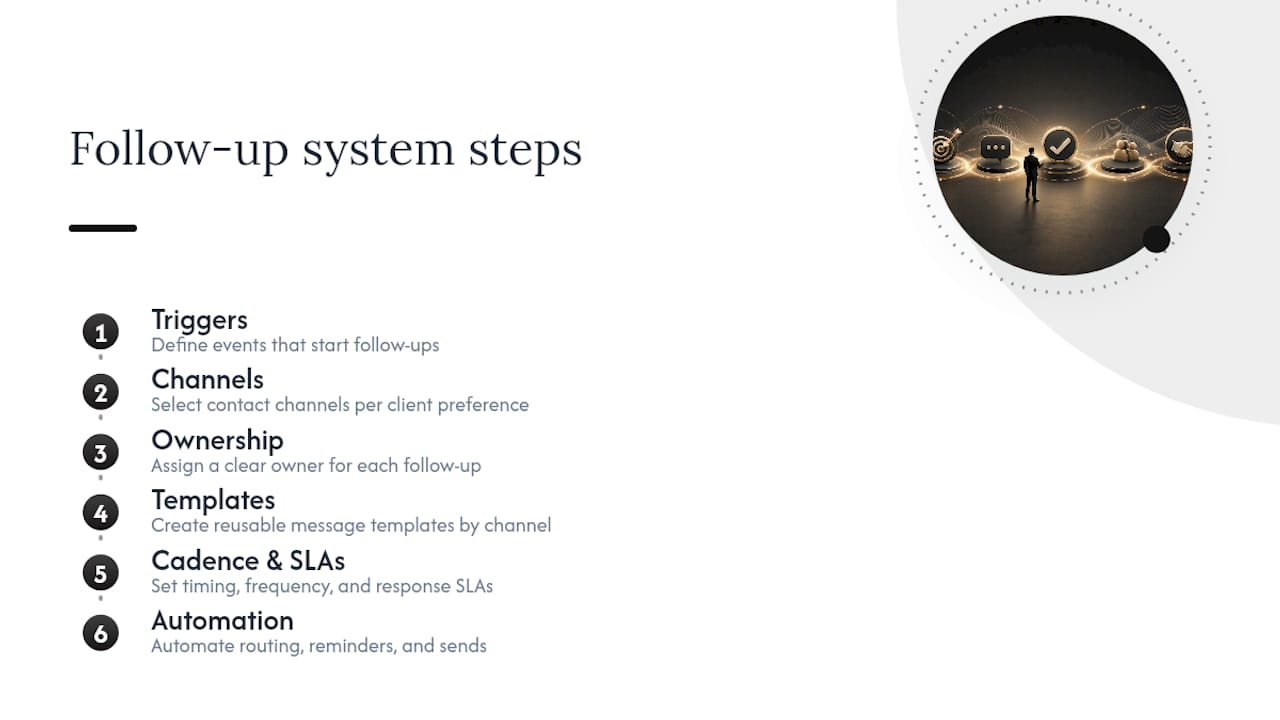
Step 1: Define your triggers
A trigger is any event that starts a follow-up sequence: an initial inquiry, a completed meeting, a sent proposal, a delivered project, or an overdue invoice. List every trigger your business generates and assign a sequence to each one.
Step 2: Map your channels
Decide which channel handles which scenario. Email for recaps and proposals. Phone for high-stakes decisions. SMS for time-sensitive nudges when you already have a warm relationship. LinkedIn for cold re-engagement. Write the rule down so every rep follows the same logic.
Step 3: Assign ownership
Name one person per client per stage. In a team environment, the rule might be: the rep who ran the meeting owns the follow-up until the deal moves to a new stage, at which point ownership transfers explicitly in the CRM.
Step 4: Build templates
Create a template for every trigger. A post-meeting recap, a proposal nudge, a payment reminder, a breakup email. Templates do not eliminate personalization; they protect the structure so reps spend their energy on the one custom sentence that makes each message feel personal.
Step 5: Set your cadence and SLAs
A simple default cadence is the 3-7-7 pattern: first follow-up on Day 3, second on Day 7, third on Day 14. Confirming the next step before ending every call converts that cadence from a chasing exercise into a confirmation sequence. Set a service-level agreement (SLA) for response time, such as same-day recap within two hours and proposal follow-up within 48 hours.
Step 6: Automate tasks, not conversations
Configure your CRM to create a follow-up task automatically when a deal moves to a new stage. The task reminds the human; the human writes the message. Triggers, templates, CRM tasks, and automations working together make follow-up inevitable rather than optional.
Step 7: Measure and iterate
Pick three KPIs from the start: reply rate by touch number, touches to close, and conversion rate after follow-up. Review them monthly and adjust cadence or templates based on what the data shows.
System design checklist:
- [ ] All triggers documented
- [ ] Channel rules written and shared
- [ ] One owner per client per stage
- [ ] Template library built and stored in CRM
- [ ] Cadence SLAs set and visible to the team
- [ ] Automation tasks configured for each trigger
- [ ] KPIs defined and reporting scheduled
Pro Tip: Schedule the next follow-up task before you close the CRM record after every call. If you wait until later, it rarely happens.
What to send in the first 48 hours after any meeting
Speed matters more than most teams realize. A same-day recap sent within two hours of a meeting reduces misunderstandings, documents action items, and demonstrates professionalism in a way that a follow-up sent three days later simply cannot replicate.
Timing rules
- 0–2 hours: Send the meeting recap. Include decisions made, next steps, and who owns what.
- 48–72 hours: Send the proposal follow-up if a proposal was shared. This is the window where interest is still warm.
- Day 7: Send a value-add follow-up if there is no reply. Attach something useful: a market report, a relevant article, a short Loom video walking through the proposal.
- Day 14: Final check-in or breakup email, depending on deal value and relationship stage.
Subject-line formulas that get opened
Avoid subject lines that read like form letters. These patterns consistently outperform generic options:
- [Project name] — next steps from today’s call
- Quick question about [specific detail discussed]
- [Client first name] — following up on the [property/proposal/invoice]
Three ready-to-use email templates
Template 1: Post-meeting recap
Subject: [Project name] — recap and next steps
Hi [First name],
Great talking today. Here is a quick summary of what we covered:
- [Decision or key point 1]
- [Decision or key point 2]
- Next step: [specific action] by [date]
Let me know if I missed anything. I will follow up on [date] as we discussed.
[Your name]
Template 2: Proposal nudge (Day 3)
Subject: [Client first name] — a quick note on the proposal
Hi [First name],
I wanted to check in on the proposal I sent over. Do you have any questions I can answer to help you move forward?
Happy to jump on a 15-minute call this week if that is easier.
[Your name]
Template 3: Payment reminder (Day 7 past due)
Subject: Invoice #[number] — quick reminder
Hi [First name],
Just a friendly note that invoice #[number] for [amount] was due on [date]. If you have already sent payment, please disregard this message.
If you have any questions about the invoice, I am happy to help.
[Your name]
Personalization that scales
A single custom sentence per email — referencing something specific from the last conversation — doubles reply odds while keeping templates reusable. Reference a detail the client mentioned: a timeline concern, a specific feature they asked about, a comment about their business. That one sentence signals you were listening.
Pro Tip: Keep a “client notes” field in your CRM for one-line personal details (preferred communication style, key concerns, decision timeline). Pull from it every time you write a follow-up.
Cadences and sequences for every common scenario
Different situations call for different rhythms. Active projects need weekly updates; awaiting-response scenarios work best on a 3/7/14 or 3/10/24 pattern depending on deal complexity. Mixing these up is one of the most common and costly mistakes in client relationship management.
Default cadence map
| Scenario | Day 1 | Day 3 | Day 7 | Day 14 | — |
|---|---|---|---|---|---|
| Post-meeting (warm lead) | Recap email | Value-add email | Phone call | Breakup email | Archive |
| Proposal sent | Confirmation email | Nudge email | Phone call | Final email | Archive |
| Overdue invoice | Reminder email | Phone call | Formal notice email | Escalate | Collections |
| Cold re-engagement | Intro email | LinkedIn DM | Phone | Breakup email | Archive |
| Post-sale nurture | Thank-you email | Onboarding check-in | Feedback request | Value content | Quarterly check-in |
Who handles each touch
- Automated: Day 1 recap, Day 3 nudge, payment reminders, task creation after stage changes.
- Manual: Phone calls, high-stakes negotiation messages, sensitive billing conversations, breakup emails.
The 3–5 purposeful touches model applies across all scenarios. Each touch must add something: a document, an answer, a relevant insight, or a clear next step. A message that only says “just checking in” adds nothing and trains clients to ignore you.
B2C vs. B2B cadence logic
A simple B2C transaction (a single buyer, a clear decision) moves faster. Three touches over 10 days is usually sufficient. A multi-stakeholder B2B deal with procurement, legal, and a budget cycle may need a 30-60-90 day cadence with different messages for different contacts in the organization. Map your cadence to the actual decision-making structure, not to a generic template.
The breakup email
When a prospect goes silent after your full sequence, a polite breakup email often triggers a final response and clears your pipeline. It also gives both parties a clean exit. Keep it short:
That message converts more final responses than a sixth follow-up and preserves the relationship for a future approach.
For follow-up strategies specifically built to convert leads at each stage of your pipeline, the approach above maps directly to what power brokers use in practice.
Choosing the right channel and personalizing at scale
Channel choice is not about preference. It is about what the client expects and what the situation demands.
When to use each channel
- Email: Recaps, proposals, invoices, value-add content, formal communications. Default for most B2B scenarios.
- Phone: High-stakes decisions, sensitive conversations, when email has gone unanswered twice.
- SMS: Time-sensitive nudges, appointment confirmations, when you have an established warm relationship and explicit consent.
- LinkedIn DM: Cold re-engagement, professional introductions, when email bounces or goes unanswered after two attempts.
Multi-channel escalation rules
Start with email. If two emails go unanswered, escalate to phone. If the phone goes unanswered, leave one voicemail and send a LinkedIn DM. If all three channels produce no response after your full sequence, send the breakup email and archive the contact.
Write this escalation rule into your CRM as a task template so reps do not have to decide in the moment.
Pro Tip: A short Loom video (90 seconds or less) attached to a proposal follow-up email consistently outperforms a text-only nudge. It shows effort, adds personality, and gives the client something concrete to react to.
Personalization patterns that scale
The most practical personalization method is a two-layer template: a fixed structure with one variable sentence slot. The variable sentence references something specific to that client. You can pull it from CRM notes, a recent news item about their business, or a detail from the last conversation.
Compliance note: SMS follow-ups require explicit opt-in consent under the Telephone Consumer Protection Act (TCPA) in the United States. Always obtain written or documented consent before adding a client to an SMS sequence, and include a clear opt-out option in every message.
| Channel | Best for | Personalization lever | Compliance note |
|---|---|---|---|
| Recaps, proposals, nurture | Subject line + one custom sentence | CAN-SPAM unsubscribe required | |
| Phone | High-stakes, sensitive | Reference last conversation detail | No cold robocalls without consent |
| SMS | Time-sensitive, warm contacts | First name + specific context | TCPA opt-in required |
| LinkedIn DM | Cold re-engagement | Reference shared connection or content | Platform terms apply |
What to automate in your CRM and what to keep human
Automation is not a replacement for relationship. It is a system that makes sure the human never forgets to show up.
Automate these tasks
- Task creation when a deal moves to a new pipeline stage
- Day 1 recap email (triggered by meeting logged in CRM)
- Payment reminder sequences (Day 1, Day 7, Day 14 past due)
- Proposal follow-up reminders (Day 3 and Day 7 after proposal sent)
- Stop sequences automatically when a client replies
Keep these manual
- Phone calls at any stage
- High-stakes negotiation messages
- Sensitive billing conversations (escalated invoices)
- Breakup emails
- Any message that requires reading the emotional temperature of the relationship
Automated sequences must stop the moment a client replies. A client who answers your Day 3 email and then receives your automated Day 7 nudge anyway will notice. That single failure erodes trust faster than a slow response ever would.
Implementation steps for common CRMs
- Create a deal stage for each trigger (Inquiry, Meeting Held, Proposal Sent, Awaiting Decision, Closed Won, Closed Lost).
- Build a task template for each stage transition (e.g., “Meeting Held” triggers a “Send recap email” task due in two hours).
- Set escalation notifications: if a task is overdue by 24 hours, notify the team lead.
- Configure ownership handoff rules: when a deal moves from Sales to Account Management, the CRM reassigns the open tasks automatically.
- Connect your email, calendar, and payment tools to the CRM so every interaction is logged without manual entry.
Integration checklist:
- [ ] Email connected and logging all sent messages
- [ ] Calendar sync active so meetings auto-create follow-up tasks
- [ ] Payment tool integrated for invoice status triggers
- [ ] Ownership rules configured for stage transitions
- [ ] Automation stop-on-reply rule active for all sequences
Pro Tip: Build your automation to create tasks for humans rather than send messages on their behalf for anything beyond Day 1. The human touch in message three is often what closes the deal.
KPIs to track for follow-up effectiveness
Measuring follow-up without a defined set of metrics is like running a sales process without a pipeline. You need both activity metrics (are we doing the work?) and outcome metrics (is the work producing results?).
Essential KPIs
| KPI | How to calculate | Directional goal |
|---|---|---|
| Reply rate by touch number | Replies ÷ messages sent, per touch | Identify which touch in the sequence gets the most responses |
| Response time | Time from client message to rep reply | Under 2 hours for warm leads |
| Touches to close | Total follow-up messages sent before deal closes | Benchmark your average, then work to reduce it |
| Conversion rate after follow-up | Deals closed ÷ deals that received a full sequence | Track improvement quarter over quarter |
| Overdue invoice recovery rate | Invoices paid after reminder sequence ÷ total overdue | Should improve as sequence quality improves |
Reporting cadence
- Daily: Review open follow-up tasks. Flag anything overdue by more than 24 hours.
- Weekly: Review cadence health. Are reps completing touches on schedule? Which templates are generating replies?
- Monthly: Review outcome metrics. Conversion rate, touches to close, invoice recovery. Identify one cadence or template to A/B test.
A simple A/B test idea: run two subject-line variants on your proposal nudge email for 30 days. Measure open rate and reply rate. Keep the winner, test the next variable.
Practical communication habits like consistent check-ins and defined responsibilities directly affect these KPIs. Teams that schedule regular reviews of their follow-up data improve faster than those who only look at outcomes at quarter-end.
Ready-to-use follow-up templates: your swipe file
The templates below are designed to be pasted directly into your CRM sequences. Each follows a five-part structure: subject line, one-sentence context, reason to reply now, single ask, warm close.
Email templates
Meeting recap
Subject: [Project] — recap from today
Hi [First name], here is a quick summary of what we covered and the next steps we agreed on. Does this look right to you?
Value-add follow-up (Day 7, no reply)
Subject: Something I thought you would find useful
Hi [First name], I came across [relevant resource/insight] and thought of our conversation about [specific topic]. No pressure on the proposal — just wanted to share this. Happy to answer any questions when you are ready.
Breakup email
Subject: Closing the loop
Hi [First name], I have not heard back and I do not want to keep cluttering your inbox. If the timing is not right, that is completely fine. Feel free to reach out whenever it makes sense. Wishing you well.
Payment reminder (Day 7 past due)
Subject: Invoice #[number] — friendly reminder
Hi [First name], invoice #[number] for [amount] was due on [date]. If payment is already on its way, please ignore this. If you have any questions, I am happy to sort it out quickly.
Phone and voicemail scripts
Voicemail (30 seconds max)
LinkedIn DM snippet
Template-to-scenario reference
| Scenario | Template to use | Ideal cadence slot |
|---|---|---|
| Post-meeting | Meeting recap | Day 1 (within 2 hours) |
| Proposal sent, no reply | Proposal nudge | Day 3 |
| No reply after nudge | Value-add follow-up | Day 7 |
| Final attempt | Breakup email | Day 14 |
| Invoice overdue | Payment reminder | Day 1, Day 7, Day 14 past due |
| Post-sale check-in | Thank-you + onboarding | Day 1 after delivery |
For post-sale nurturing, tactics like feedback requests, onboarding help, and useful content deepen engagement and drive repeat business more reliably than any discount or promotion.
Common pitfalls that kill follow-up effectiveness
Most follow-up failures are not about effort. They are about structure. Here are the mistakes that cost deals and relationships, and how to prevent each one.
The pitfalls
- Empty “just checking in” messages. No context, no value, no ask. These train clients to ignore you. Every message needs one concrete reason to reply.
- Inconsistent ownership. When two reps both think the other is following up, no one does. One owner per client, always.
- Stale contact data. A follow-up sequence aimed at a dead email address or an old phone number is invisible. Verify contact data at every stage transition.
- Over-contacting. More than five touches without a reply is usually counterproductive. Know when to stop.
- Tone mismatch. A casual tone on a formal invoice reminder, or a stiff tone on a warm relationship follow-up, signals that you are not paying attention.
- Poor documentation. If the conversation is not logged, it did not happen. Documenting key discussions, decisions, and timelines prevents scope creep and protects both parties.
Prevention checklist
- [ ] Verify email and phone at every stage transition
- [ ] Assign one named owner before the deal moves forward
- [ ] Attach a value element (document, insight, answer) to every message
- [ ] Keep one ask per message
- [ ] Escalate invoice tone gradually: friendly reminder, then formal notice, then escalation
- [ ] Send the breakup email at touch 4 or 5, not touch 8
- [ ] Log every interaction in the CRM within 24 hours
Pro Tip: Set a CRM rule that flags any deal with no logged activity in seven days. That flag is your early warning system for deals about to go cold.
Automated sequences that keep running after a client replies are one of the fastest ways to damage a relationship. Stop sequences on reply is a non-negotiable automation rule, not an optional setting.
Legal note: SMS follow-ups require documented opt-in consent under TCPA. Email sequences must include a clear unsubscribe option under CAN-SPAM. Data collected during follow-up (contact details, conversation logs) must be handled in compliance with applicable privacy laws, including state-level regulations where relevant.
How to scale follow-up across your team without losing the human touch
Scaling a follow-up system is not about sending more messages. It is about making the system consistent enough that quality does not drop when volume increases.
Review schedule
- Weekly hygiene check: Review open tasks, flag overdue follow-ups, reassign any deals where the owner is absent or has left the team.
- Monthly cadence review: Look at reply rates by touch number and template. Replace the lowest-performing template with a new variant.
- Quarterly outcome audit: Review conversion rate, touches to close, and invoice recovery rate. Decide whether to add, remove, or restructure a cadence.
Training checklist for new hires
- [ ] CRM walkthrough: how to log a contact, create a deal, and assign a task
- [ ] Template library: where templates live and how to use the one custom sentence slot
- [ ] Cadence rules: which sequence applies to which trigger
- [ ] Escalation rules: when to call instead of email, when to involve a manager
- [ ] Compliance basics: SMS opt-in, email unsubscribe, data logging requirements
Scaling guardrails
When you add automation layers, add a human checkpoint at the same time. For standard volume clients, let the automation run but set a weekly review of replies and opt-outs.
Personalization does not have to be expensive at scale. A single custom sentence per email pulled from CRM notes is enough to shift the tone from broadcast to conversation. That one sentence, multiplied across a hundred follow-ups a week, is the difference between a system that feels human and one that feels like a mail merge.
Pro Tip: When a team member is out, reassign their open follow-up tasks in the CRM the same day. A client who waits a week for a response because their rep was on vacation is a client who starts looking elsewhere.
Step-by-step follow-up workflow for brokers after a client walkthrough
This is the system in action. After a property or yacht walkthrough, here is the exact workflow a broker and their team should run, with role assignments and artifacts at each step.

The post-walkthrough sequence
Step 1: Same-day recap (Day 1, within 2 hours)
- Owner: Broker
- Channel: Email
- Content: Summary of the property toured, key features discussed, client’s stated priorities, and a clear next step (e.g., “I will send you the comparable sales report by Thursday”).
- Artifact: Photos from the walkthrough, property spec sheet, or a short Loom video recap.
Step 2: Three-day follow-up (Day 3)
- Owner: Broker or assistant
- Channel: Email or phone
- Content: Check in on questions, share the comparable sales report or additional listings that match the client’s criteria.
- Artifact: Market report, shortlist of two or three alternative properties.
Step 3: Two-week check-in (Day 14)
- Owner: Broker
- Channel: Phone (preferred) or email
- Content: Direct question: “Have you had a chance to think it over? Is there anything I can clarify or show you before you decide?”
- Artifact: Updated market data if relevant, or a note about a change in availability.
Step 4: One-month nurture (Day 30)
- Owner: Assistant or CRM automation (task for broker to review)
- Channel: Email
- Content: Value-add content (market update, new listing alert, relevant news) with no pressure. Keep the relationship warm for the next opportunity.
- Artifact: Monthly market report, curated listing alert.
Role assignments and CRM logging
- Broker: Owns Steps 1 and 3. Logs every call and email in the CRM within 24 hours.
- Assistant: Supports Step 2 with research and document preparation. Owns Step 4 task creation.
- Operations: Configures CRM triggers so each step creates the next task automatically on completion.
Client value at each touch
Each step in this sequence removes a specific friction point. The same-day recap removes uncertainty about what was discussed. The Day 3 follow-up removes the effort of the client having to ask for more information. The Day 14 call removes the awkwardness of the client having to re-initiate contact. The Day 30 nurture keeps the broker top of mind without pressure.
For a deeper look at how to improve follow-ups after a client walkthrough, including specific artifacts and CRM configurations used by power brokers, the full workflow guide covers each step in detail.
Broker follow-up workflow summary:
| Step | Day | Owner | Channel | Key artifact |
|---|---|---|---|---|
| Same-day recap | Day 1 | Broker | Photos, spec sheet, Loom | |
| Three-day check-in | Day 3 | Broker/assistant | Email or phone | Market report, shortlist |
| Two-week decision nudge | Day 14 | Broker | Phone | Updated market data |
| One-month nurture | Day 30 | Assistant/CRM | Market update, listing alert |
The mindset shift that changes everything about follow-up
Here is the reframe that changes how follow-up feels, for you and for your clients. Most sales professionals think of follow-up as chasing. The client has something you want (a decision, a payment, a signature), and you are pursuing it. That framing makes every unanswered message feel like a rejection and every follow-up feel slightly embarrassing.
Flip it. Your client has a problem they have not solved yet. Your follow-up is the act of removing friction between them and the solution. When you send a recap, you are saving them the effort of reconstructing the conversation from memory. When you send a market report on Day 3, you are giving them the information they need to make a confident decision. When you call on Day 14, you are making it easy for them to say yes without having to find your number.
That reframe changes the tone of every message you write. Instead of “just checking in,” you write “I wanted to make sure you had everything you need to move forward.” The ask is the same. The energy is completely different. Clients feel the difference, even if they cannot name it.
The teams that consistently close at the highest rates are not the ones with the most aggressive follow-up. They are the ones who make every touch feel like a service rather than a demand. Build that into your templates, your cadence, and your training, and the results follow.
Plo helps you build and run this system from day one
Plo’s platform gives brokers, luxury sales teams, and real estate professionals the CRM automation, template library, and onboarding support to put everything in this guide into production without building it from scratch. The follow-up cadences, task triggers, and ownership rules described here map directly to Plo’s workflow tools, so your team runs a consistent, measurable system from the first week.
The difference between a follow-up system that closes deals and one that lets them slip is execution at scale. Plo’s managed onboarding means your sequences are configured, your templates are loaded, and your CRM is connected before you send your first automated touch. Book a demo to see the broker follow-up workflow in action, or explore the top prospecting tools for real estate to see how Plo fits into your full sales cycle.
Sources
- Client Follow-Up Strategies That Work (2026 Guide) | Aviy
- How to Follow Up with a Client (2026 Playbook)
- How to Create an Effective Client Follow-Up System | Coherence
- How often should I follow up with clients? A freelancer’s cadence guide — ClientsPulse
- How to perfect client communication | Teamwork
- Client communication skills: follow-up and documentation | Proofhub